
I have been trying to follow a guide for creating and importing an SSH Key:
https://docs.ovh.com/ca/en/public-cloud/create-ssh-keys/
The key has been created but I am unable to advance to the import step.
I have uploaded a screenshot.
It's also online: https://i.postimg.cc/cJPtMGZN/image.png
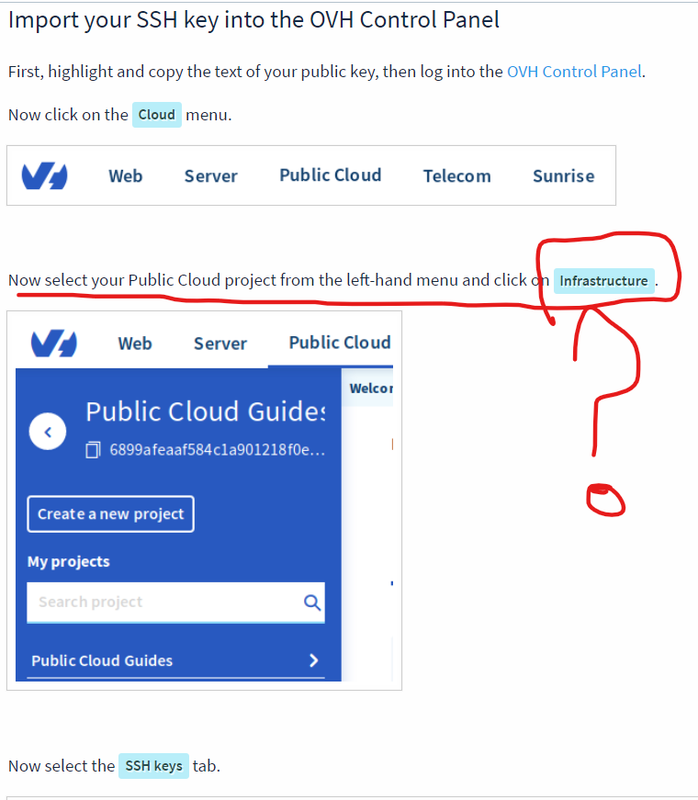
Supposedly I have to click on Public Cloud, and then I would see on the left-hand menu the INFRASTRUCTURE menu.
After clicking on Public Cloud, what I got was a prompt for a payment mean, and eventually ended up paying 10€ + VAT for credits, which I have no idea what they are used for.
Most importantly, even after buying these credits, I still cannot see the INFRASTRUCTURE menu, and therefore cannot go any further. Bottom line: what the guide shows is not the same that I can see. Hence, I cannot go any further.
Thanks in advance for any help.
V.
OVH_SSH_key_imp|436x499.
Virtual Private Servers - Importing an SSH Key
Related questions
- Installing Operating System from custom image on OVH VPS ( CentOS 8 Tutorial)
 57904
57904  11.01.2020 21:11
- SMTP server on VPS and port 25 opening
48912 10.12.2025 13:59
- Mumbai VPS data-center availability
46160 23.12.2025 04:48
- Nameserver for my vps
45641 07.08.2018 11:35
- Remote access to MySQL database
44684 16.01.2018 15:29
- VPS stuck in “Saving…” for over 24 hours – No SSH, No KVM, No Rescue
43739 10.01.2026 22:36
- Advice on products to run a simple website + CMS.
40318 07.01.2026 14:58
- VPS login and password not accepted. Reboot in Rescue Mode results in root and temp password not being accepted
38909 15.01.2026 20:04
- Change server location
37127 06.11.2020 10:16
- Redirect domain to vps
36863 03.01.2018 22:32