
Bonjour,
je suis entrain de créer un site web avec la possibilité d'envoyer un email après une inscription. Pour ce faire je dois utiliser une librairie qui a besoin du paramètre SMTP pour fonctionner mais ça n'a pas l'air d'être disponible:
Est-il possible de le configurer quelque part ?
Merci
Comment accéder aux paramètres SMTP (offre e-mail pro)
Related questions
- Signature mail Pro
 24987
24987  16.04.2018 16:59
- E-mail pro et Discourse
17696 14.01.2018 20:02
- Problème avec E-mail Pro et autodiscover/autoconfig
16115 14.08.2020 13:21
- Problème de connexion compte e-mail OVH sur Outlook (IMAP) pour Android
15224 16.04.2025 20:42
- Problème d'envoi de mail pro à mail
15050 05.07.2017 10:50
- Migration de E-mail Pro vers Exchange sur une seule des adresses
14969 16.11.2022 08:48
- Après Migration E-Mail Pro Impossible d'envoyer un Mail vers une adresse qui a le même
14239 14.02.2018 10:31
- Impossible de créer l'adresse mail prof : Vous n'avez pas la possibilité de créer de co
13300 08.07.2020 22:33
- Problème réception Mails sur ma boite mail pro Ovh
13053 22.06.2019 07:57
Bonjour @JeremyD31
As-tu essayé avec la fonction PHP **mail();** ?
Bonjour,
Voyez votre espace client, l'information doit s'y trouver.
C'est par exemple pro2.mail.ovh.net, port 587, sécurité STARTTLS
Merci pour les réponses.
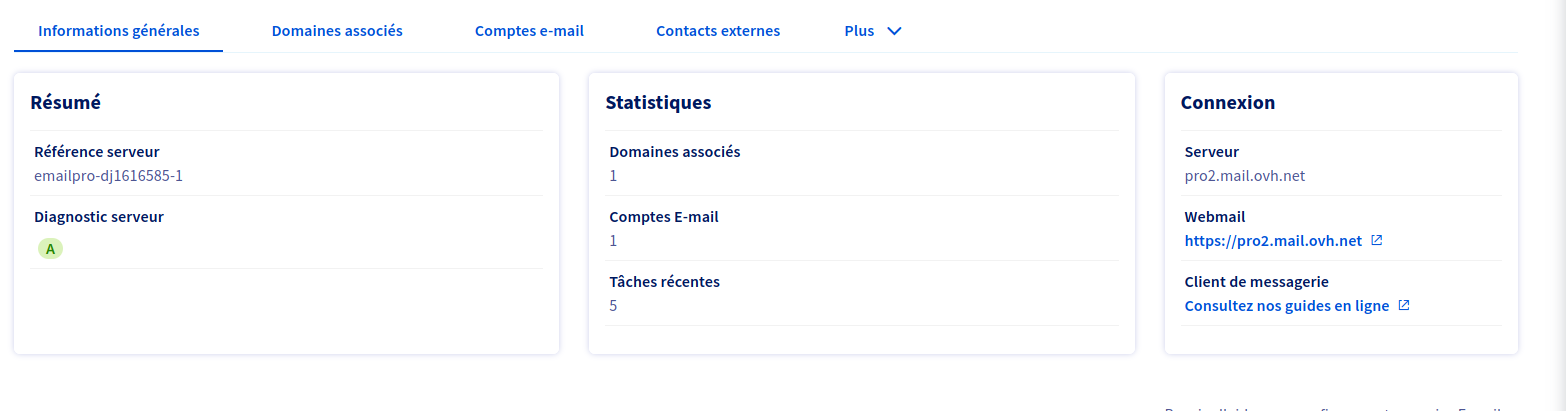
Je n'utilise pas php (node js/nodemailer)
Sinon pour l'espace client j'ai ceci:
Dans l'onglet "domaine associé" j'ai :
le logo mx en vert configuré de manière automatique
le logo "srv" en rouge avec:
"Diagnostic SRV
Étape 1 sur 2
Votre domaine est hébergé chez OVH, vous pouvez configurer le champ SRV de votre domaine brainscoding.fr de la manière suivante
Champ SRV
Sous domaine : _autodiscover._tcp
Priorité : 0
Poids : 0
Port : 443
Cible : pro2.mail.ovh.net."
Je n'utilise pas node js/nodemailer. Aussi je laisse @Fritz2cat finir de vous aider.
Utilisez les paramètres que je vous ai indiqués, ça fonctionne ?
et le login est l'adresse mail complète de votre boîte
En effet ça a fonctionné merci !
Si cela peut aider d'autre la config est la suivante:
const transporter = nodemailer.createTransport({
host: "pro2.mail.ovh.net",
port: 587,
secure: false,
auth: {
user: process.env.MAILER_USER,
pass: process.env.MAILER_PASSWORD,
},
});
le "secure" à false c'est par rapport au STARTTLS (documentation ici: https://nodemailer.com/smtp/)
Pour le moment c'est environnement de dev et cela fonctionne, en esperant que cela passe aussi sur la prod. Merci ! :)
```text
Avec cette configuration il est probable que votre mot de passe se balade en clair sur le réseau. Ce n'est pas top.
Si vous voulez creuser plus loin: https://nodemailer.com/smtp/
TLS options
secure – if true the connection will use TLS when connecting to server. If false (the default) then TLS is used if server supports the STARTTLS extension. In most cases set this value to true if you are connecting to port 465. For port 587 or 25 keep it false
tls – defines additional node.js TLSSocket options to be passed to the socket constructor, eg. {rejectUnauthorized: true}.
tls.servername - is optional hostname for TLS validation if host was set to an IP address
ignoreTLS – if this is true and secure is false then TLS is not used even if the server supports STARTTLS extension
requireTLS – if this is true and secure is false then Nodemailer tries to use STARTTLS even if the server does not advertise support for it. If the connection can not be encrypted then message is not sent
Setting secure to false does not mean that you would not use an encrypted connection. Most SMTP servers allow connection upgrade via STARTTLS command but to use this you have to connect using plaintext first.
Si vous voulez jouer avec secure, et que ça ne fonctionne pas, utilisez le port 465 au lieu de 587. ```