
Hi everyone,
We run the following services from OVH:
- A domain registration with DNS zone management
- a hosting plan (used to host static files only, through dedicated subdomains)
- a MX Plan for having emailing capabilities
We also have 2 Ubuntu virtual servers behind a load-balancer hosted in a third-party company (DigitalOcean). On each of these servers, we run an instance of our NodeJS back-end application. These instances are monitored thanks to the PM2 process-manager. The Nginx web-server acts as a reverse-proxy pointing to our web application instances running on some ports.
On OVH, we created A and AAAA records to point the HTTP / HTTPS traffic to this load-balancer.
We also have created A and AAAA records for 2 subdomains pointing to each of our 2 back-end servers directly, without going through the load-balancer (on a specific port).
We created an email address thanks to our MX plan @ OVH.
Our Node JS application uses the nodemailer module in order to send emails to our users. It uses the nodemailer's internal SMTP transporter that uses the OVH email address and password mentioned just before.
When we target the first server (thanks to its dedeciated subdomain and port), it is actually able to send emails to my Gmail account (or any other provider). I get this piece of information...
When we target the other server, I get the exact same type of logs. But I never receive this same email in my Gmail account.
Both servers run the same version of Ubuntu and Nginx. The source code of the apps, including the dependencies are in the exact same version. On one machine, the sending of the email via OVH always work. On the other machine, it started to fail some time ago, and it never worked anymore since then.
Once, I had the exact same issue and was able to fix it by simply destroying the guilty Ubuntu virtual server. When I created a new one and installed everything again, it started to work on both servers again :)
It just does not make any sense to me! Does anyone see a possible explanation and fix that does not require this painful server's destruction and re-creation each time this issue occurs?
Technically speaking, the newly created Ubuntu server just have a different public IP than the one I destroyed.
I searched for feedback here, with no luck...
Is it possible that the OVH SMTP server starts to kind of blacklist one of my servers's IP ?
Could it relate to some quota? Is there any way to monitor our SMTP quotas (if any) on the OVH platform, when we use an "MX Plan".
Any help appreciated..
Thanks
E-mails et solutions Office - OVH SMTP server issue. Any possible explanation welcome!
Related questions
- Compte bloqué pour Spam, impossible de le débloquer
 115716
  03.01.2024 08:02
- Changer le mot de passe email depuis roundcube
112713 24.06.2017 14:28
- Email frauduleux au nom de OVH
112240 13.08.2017 18:14
- Autodiscover et Microsoft Outlook 2016
87627 23.11.2016 15:15
- Question sur antispam OVH
85601 17.03.2017 16:11
- OVH sur un iPhone "Échec de l'envoi de l'e-mail : l'adresse de l’expéditeur est incorre
85593 07.08.2017 08:45
- Arrêt de la commercialisation du MX plan
80608 30.11.2017 11:26
- Mail non délivrés ou en spam chez nos clients
76475 15.11.2017 10:30
- Envois de mails / erreur 521
74443 05.04.2017 11:42
- Comment configurer une entrée DNS de type DKIM chez OVH ?
73842 12.03.2019 17:41
Hello , as you provide no real information, we will stick to generalities.
Abandon for sure the naming conventions such as 'smtp.yourdomain.com' in favour of 'ssl0.ovh.net' , because the certificate supplied by this server shows ssl0.ovh.net and not any name in your domain.
As far as I know, as soon as Gmail accepts a mail it will show up in your Gmail mailbox, possibly in a spam folder. E-mails which are clearly spam are rejected by Gmail during the SMTP transaction, and never get a successful message such as "queued as XXXXX".
This is not true for OVH, especially if you use aliases or redirections (e.g. support@yourOVHdomain.com is an alias which forwards ao alice@ and/or bob@ )
Hi! Thank you for your input...
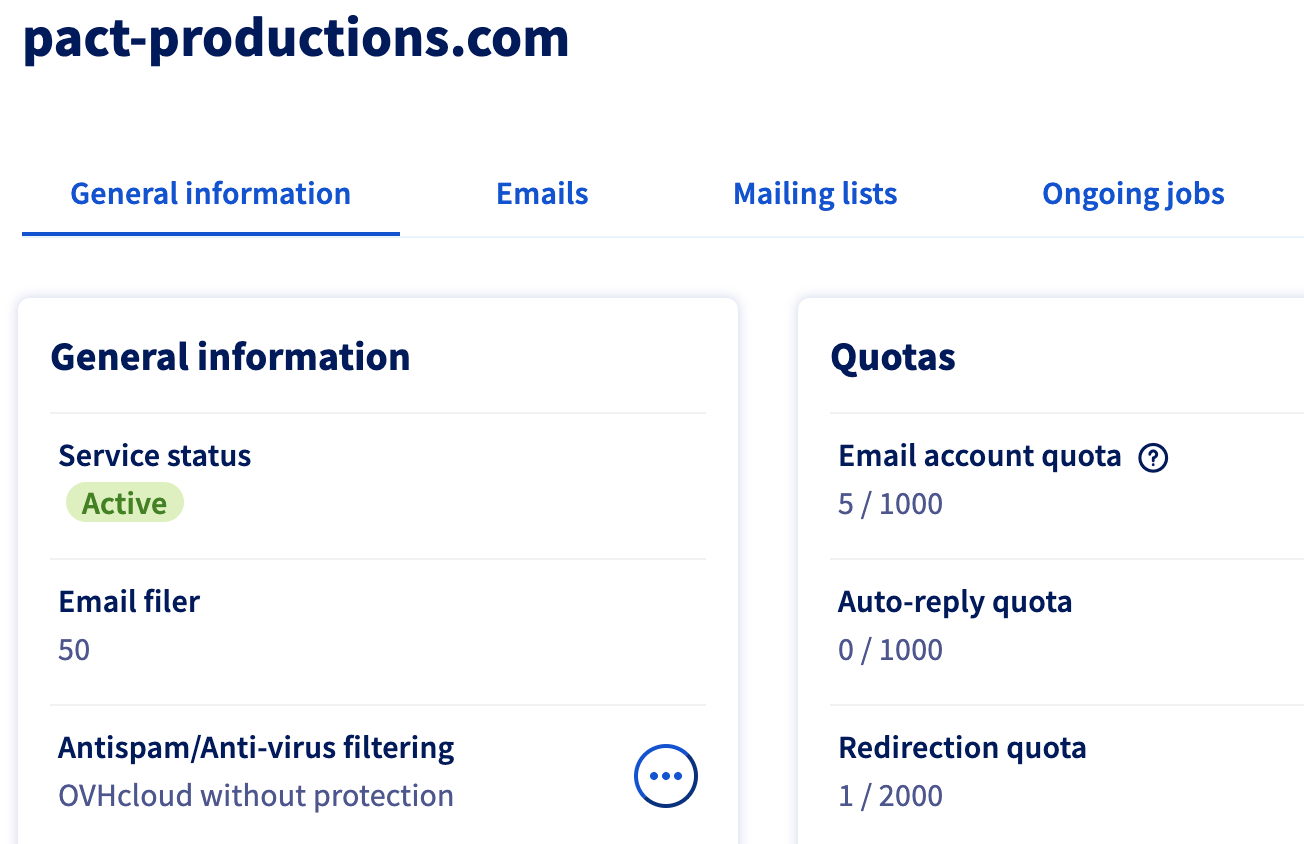
What piece of real information would you need to go further than general information? I can tell that the domain is "pact-productions.com".
I dropped the "smtp.pact-productions.com" as SMTP host for "ssl0.ovh.net" (I will thus drop the CNAME DNS record I created and that points to "ssl0.ovh.net"). But before that, it did not seem to be blocker as server #1 could send emails that I actually received on my Gmail account.
To simplify my investigation, I installed the ssmtp command-line tool on both servers. And I was actually able to reproduce the issue: emails are received when send form server #1 (207.154.248.31) and not received when sent from server #2 (206.81.17.175). So I now know that my Nginx, PM2, NodeJS (and its dependencies) stack is not to blame. So both Ubuntu servers are in the same state for sure. I ran some consistency check on both of them and nothing seems corrupted.
On the OVH manager, I tried to switch the "Antispam/Anti-virus filtering" to "OVHcloud without protection" with no luck. Server#2 's emails are still not received on my Gmail (I also checked SPAM).
Do you need my MX records to investigate deeper? Or wouldn't it be safe to post it here?
I can add that the OVH email account I use to send emails with SMTP transporter is not an alias nor a redirection. It is an actual email that I can check with the online OVH Roundcube webmail.
So I can consider that the issue is actually related to the IP of my server #2.
It is pretty unlikely, according to me, that some lower-level utility is messy or corrupted in server #2 and not in server #1. Can you confirm my feeling?
I checked the 2 IPs I mentioned with https://cleantalk.org/">the CleanTalk tool.
The server #2 IP (206.81.17.175) was apparently involved in some attack in the past (August 2019) and was reported as SPAM, as far as I understand. The server #1 IP seems clean. I asked to remove 206.81.17.175 form the tool's registry. Apparently it can take a while.
What I do not get, is that I created my droplet #2 only 4 month ago. I then guess that this IPv4 was used in the past to perform wrong activities. And that it was re-used and affected to my new droplet 4 month ago. Is it something that can actually occur ? What is strange is that I am 99% sure that server #2 was actually able to send emails at its beginning, as I now check each individual droplet that I add.
Do you know if it is possible to check on the OVH platform if this IP is actually black-listed?
And how I could request it to be whitelisted from OVH?
Do you know more about possible SMTP quotas with the MX Plan? Can we check it somehow? Are SMTP quotas handled by server's IP or quotas are just overall checked by email account (noreply@my-ovh-domain.com). Maybe sever #2 exceeded the quota, and not server#1. Ain't it strange that quotas could exist without any mean to check it ?
I should mention that on the OVH manager the emails are accessible through the "Emails" menu and not the "E-mail Pro" menu.
Do you see possible other root-causes to my issue, besides something related to my server's IP or quotas?
Thanks a lot for you time and involvement !
Best regards
And you confirm that your application or mail software, wile transmitting the e-mail to OVH server: ssl0.ovh.net receives a confirmation message "Queued - transaction ID" ?
I am not from the OVH staff and the OVH staff will not answer here to such incidents.
Please open an incident ticket with useful data:
sending address, recipient address, date and time (and time zone) , ID of the transaction as explained above.
Otherwise it is searching for a needle in a haw stack.
As you have a server in DigitalOcean, whare are you relaying your e-mails via OVH infrastructure ?
Please know that ssl0.ovh.net was initially devoted to transactional mail, i.e. mail sent from humans and not from machines.
We have a poor support plan. Nowhere I found a possibility to actually write a message to support. I only can access a list of dropdown lists to target my kind of issue. Maybe I will be able to find the support's email and send something from outside the OVH manager.
I had the same info / logs form server #1 and #2, as shown in my 2nd screenshot in the first email, when using the Node app. Message was apparently sent. I had the same status (250), and got a message ID like GUID@1production.com.production.com.
I gathered no logs with the use of ssmpt, yet. I will thy with this one too:https://doc.1fr.org/msmtpfr.org/msmtp
Again. Thanks a lot!
The domain and DNS zone is managed on the OVH side.
I don't think that we can handle some.email@1productions.comproductions.com on the DigitalOcean side.
On option could be to migrate everything (domain, DNS zone management, emails, and static files hosting) to DigitalOcean. I wanted to avoid such situation :)
Thanks
OVH has a rather poor e-mail deliverability. The incidents reported (e.g. via Spamcop) are not processed. I am personally harassed by a spamgang who send a new spam campaign every week or half week, new VPS, new domain. They are still welcome on OVH and continue their misbehaviour.
You should better use DO infrastructure.