
Ciao a tutti,
avrei bisogno di aiuto per configurare il record dmarc che non riesco ancora a vedere pubblicato per il mio dominio affittibrevi360.it:
https://mxtoolbox.com/SuperTool.aspx?abt_id=AB-631B&abt_var=Control&run=toolpage&action=dmarc%3aaffittibrevi360.it
e
https://dmarcian.com/domain-checker/?domain=planbee.bz
Il fornitore del servizio mail è google e l'assistenza di google workspace mi ha detto di inserire nella zona dns del dominio le istruzioni presenti nell'immagine allegata.
Temo che sia qualche errore di sintassi o configurazione.
Qualcuno sa aiutarmi?
Grazie in anticipo.
Daniele
E-mails et solutions Office - problema con record DMARC nella mail
Related questions
- Compte bloqué pour Spam, impossible de le débloquer
 105426
  03.01.2024 08:02
- Changer le mot de passe email depuis roundcube
102583 24.06.2017 14:28
- Email frauduleux au nom de OVH
100316 13.08.2017 18:14
- Autodiscover et Microsoft Outlook 2016
76767 23.11.2016 15:15
- OVH sur un iPhone "Échec de l'envoi de l'e-mail : l'adresse de l’expéditeur est incorre
74909 07.08.2017 08:45
- Question sur antispam OVH
74836 17.03.2017 16:11
- Arrêt de la commercialisation du MX plan
70599 30.11.2017 11:26
- Mail non délivrés ou en spam chez nos clients
66688 15.11.2017 10:30
- Envois de mails / erreur 521
64457 05.04.2017 11:42
- Comment configurer une entrée DNS de type DKIM chez OVH ?
64226 12.03.2019 17:41
Bonjour,
Vos enregistrements DMARC ne sont pas conformes.
1) il ne peut y avoir qu'un seul enregistrement DMARC, et pas deux.
2) il manque le sous-domaine "_dmarc."
donc votre enregistrement DMARC devrait se trouver à:
`_dmarc.affittibrevi360.it`
au lieu de
`affittibrevi360.it`
quindi, se ho capito bene, la sintassi corretta è la seguente?
"v=DMARC1; p=none; rua=mailto:dmarc-reports@_dmarc.affittibrevi360.it"
Grazie per l'attenzione.
Daniele
Non ce n'est pas ça


Ceci c'est faux.
Vous devez ajouter le sous-domaine "_dmarc" ici:
così è corretto?
C'est correct.
Vous avez quand même une erreur:
Google répond que votre adresse dmarc-reports@affittibrevi360.it n'existe pas.
Vous ne devez pas demander à des serveurs mail d'envoyer des rapports à une adresse inexistante !!
Connection to ASPMX.L.GOOGLE.COM (2a00:1450:400c:c0a::1b) 25 port [tcp/smtp] succeeded!
220 mx.google.com ESMTP ffacd0b85a97d-36d272ba0c4si1829187f8f.881 - gsmtp
250 mx.google.com at your service
250 2.1.0 OK ffacd0b85a97d-36d272ba0c4si1829187f8f.881 - gsmtp
550-5.1.1 The email account that you tried to reach does not exist. Please try
550-5.1.1 double-checking the recipient's email address for typos or
550-5.1.1 unnecessary spaces. For more information, go to
550 5.1.1 https://support.google.com/mail/?p=NoSuchUser ffacd0b85a97d-36d272ba0c4si1829187f8f.881 - gsmtp
Ho proceduto alla configurazione con le tue indicazioni e ora sembra ora essere tutto ok.
Il record dmarc è pubblicato in entrambi gli strumenti:
https://dmarcian.com/domain-checker/?domain=planbee.bz
https://mxtoolbox.com/SuperTool.aspx?abt_id=AB-631B&abt_var=Control&run=toolpage&action=mx%3aaffittibrevi360.it
Inoltre il record dmarc è anche visibile nello strumento di google
https://toolbox.googleapps.com/apps/dig/#TXT/
Non riesco però ancora a capire il motivo per cui i messaggi che invio dal form di contatto del sito affittibrevi360.it arrivano sempre negli spam.
Il motivo potrebbe l'errore che mi hai appena segnalato?
cioè questo:
Connection to ASPMX.L.GOOGLE.COM (2a00:1450:400c:c0a::1b) 25 port [tcp/smtp] succeeded!
220 mx.google.com ESMTP ffacd0b85a97d-36d272ba0c4si1829187f8f.881 - gsmtp
250 mx.google.com at your service
250 2.1.0 OK ffacd0b85a97d-36d272ba0c4si1829187f8f.881 - gsmtp
550-5.1.1 The email account that you tried to reach does not exist. Please try
550-5.1.1 double-checking the recipient's email address for typos or
550-5.1.1 unnecessary spaces. For more information, go to
550 5.1.1 https://support.google.com/mail/?p=NoSuchUser ffacd0b85a97d-36d272ba0c4si1829187f8f.881 - gsmtp
Grazie in anticipo
Bonjour,
Le message d'erreur indique que le compte mail n'existe pas, ce n'est pas un problème de DMARC ou autres.
Cordialement, janus57
per favore, potresti verificare se questo errore appare ancora?
In ogni caso, l'indirizzo mail corretto è info@affittibrevi360.it
Envoyez un mail de test à 1tester.comtester.com
Indiquez ici le code unique de votre test, svp.
Votre DMARC est correct maintenant:
_dmarc.affittibrevi360.it. 3600 IN TXT "v=DMARC1; p=reject; pct=50;"
Vous avez enlevé la phrase "rua=......" et c'est une très bonne idée si vous ne voulez pas recevoir des rapports que vous ne compredrez quand même pas.
Par contre las mails qui arrivent en spam, ils sont envoyés depuis votre site web chez OVH ou bien depuis Google mail ?
https://photos.app.goo.gl/7oirP9p4P5uvWspR6
Dal form di contatto del sito ovh
Precisamente da questo URL
https://affittibrevi360.it/contatti/
Le mail che invece invio e ricevo da Gmail funzionano correttamente
Votre SPF:
"v=spf1 a mx include:_spf.google.com -all"
n'autorise que Google.
OVH avait mis un SPF: "include:mx.ovh.com"
pour autoriser l'envoi depuis les serveurs d'OVH.
Vous l'avez retiré, et vous avez donc retiré cette autorisation.
Sachez aussi que les mots "a" et "mx" sont inutiles et contre-productifs ici.
E' stata proprio l'assistenza telefonica di google che mi indicato di configurare "v=spf1 a mx include:_spf.google.com -all"
Mi sto accorgendo però che l'assistenza di google è poco competente.
Quindi per rendere funzionante il form di contatto devo sostituire "v=spf1 a mx include:_spf.google.com -all" con "v=spf1 include:mx.ovh.com" ?
Grazie
Vous jouez à Mc Gyver parce que vous faites des changements sans vous documenter.
Vous devez mettre les deux dans un seul SPF, par exemple:
`"v=spf1 include:mx.ovh.com include:_spf.google.com -all"`
I did what you instructed. I tried to test the contact form but the emails always arrive in SPAM
What other problem could it be?
with the google workspace email log checking tool I tried to scan the email that arrived in the spam folder.
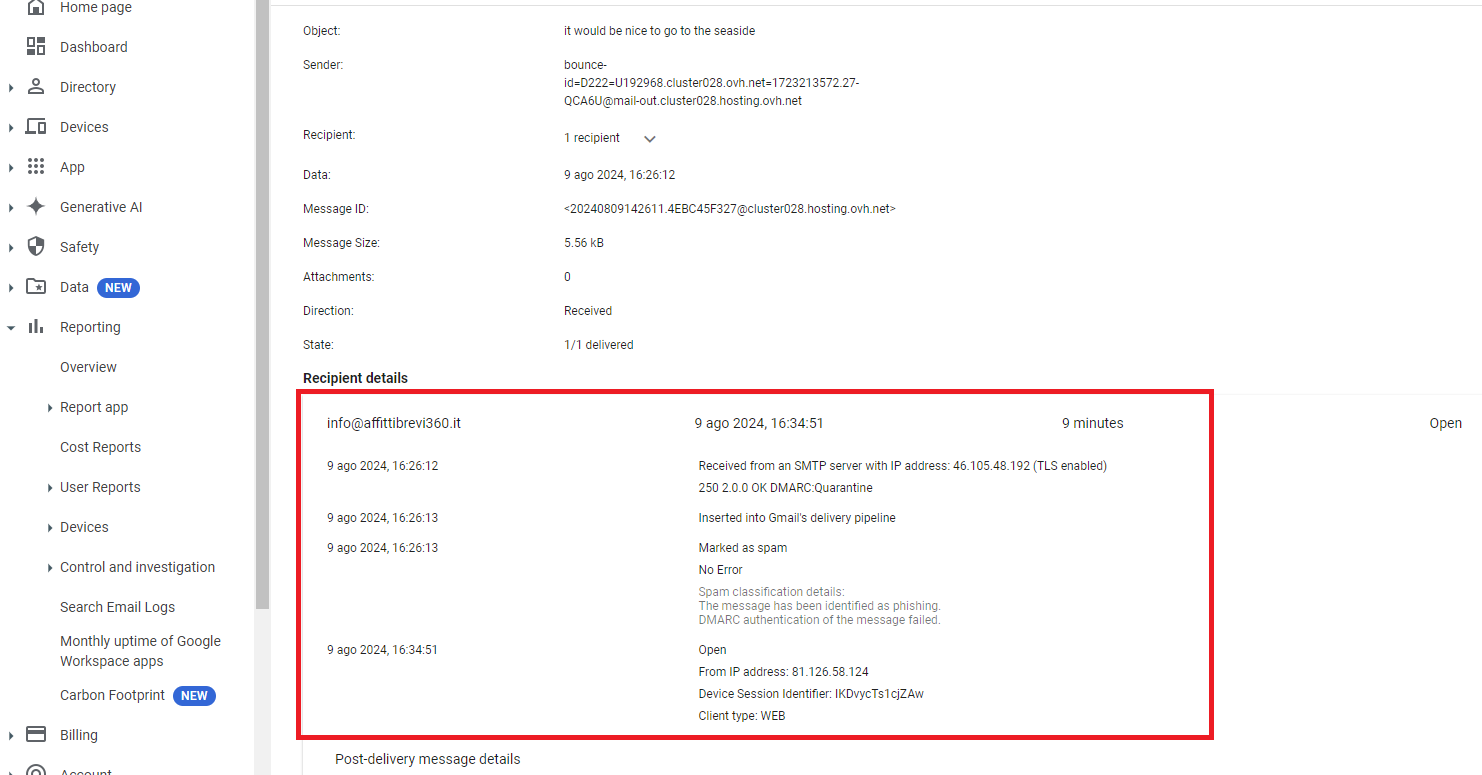
This is the report
qualcuno può aiutarmi?