
bonjour a tous
j'ai migrer mon site web wordpress d'un hébergement a un vps j'ai tout fait correctement le seul souci c'est que j'ai que la page d’accueil et le panneaux d'admin qui fonctionne en allant sur n' importe quel sujet et jai le messages suivant qui s'affiche
Not Found
The requested URL was not found on this server.
Apache/2.4.25 (Debian) Server at www.xxxxxxx.com Port 443
jai essayer de changer mon fichier .htaccess rien ne change
mai quand jai essayer de changer le permalink dans wordpress la seul option qui fonctionne cest la première
Plain https://www.xxxx.com/?p=123
et encore elle m'affiche la version mobile alors que je suis sur mon ordinateur .
merci d'anvance pour votre temps et repense
Problème wordpress suite a une migration
Related questions
- Perte de mot de passe
 51519
51519  26.05.2023 13:36
- Comment configurer/utiliser un SMTP depuis un VPS ?
49725 07.10.2019 10:49
- Je connais que le mutu et besoin de node js
49353 14.04.2017 13:34
- Qu'est-ce vcore?
48524 06.01.2017 19:20
- Envoi Email via SMTP (port 587) sur VPS Pro1
47419 27.01.2017 10:02
- [résolu] Serveur Mysql - hôte inconnu
44923 19.01.2017 16:21
- Mon VPS à Timed Out
44792 15.03.2017 22:50
- Délai de livraison VPS
44762 11.07.2018 15:15
- Problème avec statisitique Plesk
41755 29.03.2017 07:44
- Accès externe base de données
41170 18.07.2018 10:29
dans la table options:
tu as l'option **rewrite_rules**?
elle n'est pas vide?
merci pour votre repense
jai remis le fichier de base de wordpress
# BEGIN WordPress
RewriteEngine On
RewriteBase /
RewriteRule ^index\.php$ - [L]
RewriteCond %{REQUEST_FILENAME} !-f
RewriteCond %{REQUEST_FILENAME} !-d
RewriteRule . /index.php [L]
# END WordPress
oui, il ne reste plus que les options rewrite_rules, à vérifier
comment je peux faire sa svp ?
utilise phpMyAdmin ou Adminer, ou la ligne de commande, je ne sais pas ce qui est installé dans ton Vps
jai phpMyAdmin
pour infos jai garder le même nom de domaine donc ces les mêmes urls qu avant
tu as _ReallySimpleSSL_ qui est une source à chagrins et un bon ralentisseur inutile
j'ai essayer de le désinstaller toujours pareil :'(
es ce que vous penser que je doit changer les droits des dossiers ou un truck de ce genre ?
le mod rewrite c'est sur apache.
Il faut aller voir si dans /etc/apache2/mods-enabled tu as un lien rewrite.load.
Si il n'y est pas essaie un a2enmod rewrite, puis un apachectl restart.
merci pour votre repense
voila le contenu du fichier
LoadModule rewrite_module /usr/lib/apache2/modules/mod_rewrite.so
nan mais je sais ce que contient le fichier mod rewrite... je vous demandais si il était bien présent dans /etc/apache2/mods-enabled/
Et si ça ne marche tjrs pas c'est qu'il faut autoriser un "override", par défaut les .htaccess ne sont pas lus.
Où se trouve le site (dossier) et pourriez vous me donner une copie du vhost ?
```text encore merci pour votre repense
mon site se trouve dans le dossier
/var/www/html
le contenu de mon fichier .htaccess :
# BEGIN WordPress
# The directives (lines) between `BEGIN WordPress` and `END WordPress` are
# dynamically generated, and should only be modified via WordPress filters.
# Any changes to the directives between these markers will be overwritten.
RewriteEngine On
RewriteBase /
RewriteRule ^index\.php$ - [L]
RewriteCond %{REQUEST_FILENAME} !-f
RewriteCond %{REQUEST_FILENAME} !-d
RewriteRule . /index.php [L]
# END WordPress
pour mes fichiers vhost jai 3 fichiers
**000-default.conf:**
# The ServerName directive sets the request scheme, hostname and port that
# the server uses to identify itself. This is used when creating
# redirection URLs. In the context of virtual hosts, the ServerName
# specifies what hostname must appear in the request's Host: header to
# match this virtual host. For the default virtual host (this file) this
# value is not decisive as it is used as a last resort host regardless.
# However, you must set it for any further virtual host explicitly.
#ServerName www.example.com
ServerAdmin webmaster@localhost
DocumentRoot /var/www/html
# Available loglevels: trace8, ..., trace1, debug, info, notice, warn,
# error, crit, alert, emerg.
# It is also possible to configure the loglevel for particular
# modules, e.g.
#LogLevel info ssl:warn
ErrorLog ${APACHE_LOG_DIR}/error.log
CustomLog ${APACHE_LOG_DIR}/access.log combined
# For most configuration files from conf-available/, which are
# enabled or disabled at a global level, it is possible to
# include a line for only one particular virtual host. For example the
# following line enables the CGI configuration for this host only
# after it has been globally disabled with "a2disconf".
#Include conf-available/serve-cgi-bin.conf
RewriteEngine on
RewriteCond %{SERVER_NAME} =www.xxxxxxxxx.com
RewriteRule ^ https://%{SERVER_NAME}%{REQUEST_URI} [END,NE,R=permanent]
# vim: syntax=apache ts=4 sw=4 sts=4 sr noet
**000-default-le-ssl.conf**
# The ServerName directive sets the request scheme, hostname and port that
# the server uses to identify itself. This is used when creating
# redirection URLs. In the context of virtual hosts, the ServerName
# specifies what hostname must appear in the request's Host: header to
# match this virtual host. For the default virtual host (this file) this
# value is not decisive as it is used as a last resort host regardless.
# However, you must set it for any further virtual host explicitly.
#ServerName www.example.com
ServerAdmin webmaster@localhost
DocumentRoot /var/www/html
# Available loglevels: trace8, ..., trace1, debug, info, notice, warn,
# error, crit, alert, emerg.
# It is also possible to configure the loglevel for particular
# modules, e.g.
#LogLevel info ssl:warn
ErrorLog ${APACHE_LOG_DIR}/error.log
CustomLog ${APACHE_LOG_DIR}/access.log combined
# For most configuration files from conf-available/, which are
# enabled or disabled at a global level, it is possible to
# include a line for only one particular virtual host. For example the
# following line enables the CGI configuration for this host only
# after it has been globally disabled with "a2disconf".
#Include conf-available/serve-cgi-bin.conf
ServerName www.xxxxxx.com
SSLCertificateFile /etc/letsencrypt/live/www.xxxxxxxx.com/fullchain.pem
SSLCertificateKeyFile /etc/letsencrypt/live/www.xxxxxxx.com/privkey.pem
Include /etc/letsencrypt/options-ssl-apache.conf
**default-ssl.conf**
ServerAdmin webmaster@localhost
DocumentRoot /var/www/html
# Available loglevels: trace8, ..., trace1, debug, info, notice, warn,
# error, crit, alert, emerg.
# It is also possible to configure the loglevel for particular
# modules, e.g.
#LogLevel info ssl:warn
ErrorLog ${APACHE_LOG_DIR}/error.log
CustomLog ${APACHE_LOG_DIR}/access.log combined
# For most configuration files from conf-available/, which are
# enabled or disabled at a global level, it is possible to
# include a line for only one particular virtual host. For example the
# following line enables the CGI configuration for this host only
# after it has been globally disabled with "a2disconf".
#Include conf-available/serve-cgi-bin.conf
# SSL Engine Switch:
# Enable/Disable SSL for this virtual host.
SSLEngine on
# A self-signed (snakeoil) certificate can be created by installing
# the ssl-cert package. See
# /usr/share/doc/apache2/README.Debian.gz for more info.
# If both key and certificate are stored in the same file, only the
# SSLCertificateFile directive is needed.
SSLCertificateFile /etc/ssl/certs/ssl-cert-snakeoil.pem
SSLCertificateKeyFile /etc/ssl/private/ssl-cert-snakeoil.key
# Server Certificate Chain:
# Point SSLCertificateChainFile at a file containing the
# concatenation of PEM encoded CA certificates which form the
# certificate chain for the server certificate. Alternatively
# the referenced file can be the same as SSLCertificateFile
# when the CA certificates are directly appended to the server
# certificate for convinience.
#SSLCertificateChainFile /etc/apache2/ssl.crt/server-ca.crt
# Certificate Authority (CA):
# Set the CA certificate verification path where to find CA
# certificates for client authentication or alternatively one
# huge file containing all of them (file must be PEM encoded)
# Note: Inside SSLCACertificatePath you need hash symlinks
# to point to the certificate files. Use the provided
# Makefile to update the hash symlinks after changes.
#SSLCACertificatePath /etc/ssl/certs/
#SSLCACertificateFile /etc/apache2/ssl.crt/ca-bundle.crt
# Certificate Revocation Lists (CRL):
# Set the CA revocation path where to find CA CRLs for client
# authentication or alternatively one huge file containing all
# of them (file must be PEM encoded)
# Note: Inside SSLCARevocationPath you need hash symlinks
# to point to the certificate files. Use the provided
# Makefile to update the hash symlinks after changes.
#SSLCARevocationPath /etc/apache2/ssl.crl/
#SSLCARevocationFile /etc/apache2/ssl.crl/ca-bundle.crl
# Client Authentication (Type):
# Client certificate verification type and depth. Types are
# none, optional, require and optional_no_ca. Depth is a
# number which specifies how deeply to verify the certificate
# issuer chain before deciding the certificate is not valid.
#SSLVerifyClient require
#SSLVerifyDepth 10
# SSL Engine Options:
# Set various options for the SSL engine.
# o FakeBasicAuth:
# Translate the client X.509 into a Basic Authorisation. This means that
# the standard Auth/DBMAuth methods can be used for access control. The
# user name is the `one line' version of the client's X.509 certificate.
# Note that no password is obtained from the user. Every entry in the user
# file needs this password: `xxxxxxxxxzxxA'.
# o ExportCertData:
# This exports two additional environment variables: SSL_CLIENT_CERT and
# SSL_SERVER_CERT. These contain the PEM-encoded certificates of the
# server (always existing) and the client (only existing when client
# authentication is used). This can be used to import the certificates
# into CGI scripts.
# o StdEnvVars:
# This exports the standard SSL/TLS related `SSL_*' environment variables.
# Per default this exportation is switched off for performance reasons,
# because the extraction step is an expensive operation and is usually
# useless for serving static content. So one usually enables the
# exportation for CGI and SSI requests only.
# o OptRenegotiate:
# This enables optimized SSL connection renegotiation handling when SSL
# directives are used in per-directory context.
#SSLOptions +FakeBasicAuth +ExportCertData +StrictRequire
SSLOptions +StdEnvVars
SSLOptions +StdEnvVars
# SSL Protocol Adjustments:
# The safe and default but still SSL/TLS standard compliant shutdown
# approach is that mod_ssl sends the close notify alert but doesn't wait for
# the close notify alert from client. When you need a different shutdown
# approach you can use one of the following variables:
# o ssl-unclean-shutdown:
# This forces an unclean shutdown when the connection is closed, i.e. no
# SSL close notify alert is send or allowed to received. This violates
# the SSL/TLS standard but is needed for some brain-dead browsers. Use
# this when you receive I/O errors because of the standard approach where
# mod_ssl sends the close notify alert.
# o ssl-accurate-shutdown:
# This forces an accurate shutdown when the connection is closed, i.e. a
# SSL close notify alert is send and mod_ssl waits for the close notify
# alert of the client. This is 100% SSL/TLS standard compliant, but in
# practice often causes hanging connections with brain-dead browsers. Use
# this only for browsers where you know that their SSL implementation
# works correctly.
# Notice: Most problems of broken clients are also related to the HTTP
# keep-alive facility, so you usually additionally want to disable
# keep-alive for those clients, too. Use variable "nokeepalive" for this.
# Similarly, one has to force some clients to use HTTP/1.0 to workaround
# their broken HTTP/1.1 implementation. Use variables "downgrade-1.0" and
# "force-response-1.0" for this.
# BrowserMatch "MSIE [2-6]" \
# nokeepalive ssl-unclean-shutdown \
# downgrade-1.0 force-response-1.0
# vim: syntax=apache ts=4 sw=4 sts=4 sr noet
après je sais pas comment autoriser un override
merci encore pour votre aide ```
2 solutions :
- Modifier le fichier /etc/apache2/apache2.conf
Il doit y avoir un passage à propos de /var/www/
ça doit ressembler un peu à ça.
< Directory /var/www/ >
Options -Indexes +FollowSymLinks
AllowOverride None
Require all granted
< /Directory >
Vous pouvez mettre AllowOverride All
Et redémarrer Apache.
L'autre solution c'est de rajouter ça dans le vhost :
< Directory /var/www/html >
AllowOverride All
Require all granted
< /Directory >
ça devrait activer les .htaccess et résoudre votre problème.
je vous remercie énormément
enfin sa fonctionne deux semaine de galère
excusez moi jai rencontrer un autre souci
donc pour linstant mon site qui se situe a
/var/www/html fonctionne très bien et un grand merci a vous
sauf que javait le même problème avec mon deuxième site qui se situe au /var/www/html/sitetest/
mai maintenant il m'affiche
**Forbidden**
**You don't have permission to access this resource.**
**Apache/2.4.25 (Debian) Server at www.xxxxxxx.com Port 80**
jai essayer de générer une deuxième fois le certificat ssl avec la commande
**./certbot-auto**
mai jai toujours le même problème
**Forbidden**
**You don't have permission to access this resource.**
**Apache/2.4.25 (Debian) Server at www.xxxxxx.com Port 443**
sur mes vhost jai un 4 éme fichier sous le nom de
**xxxxxxxxx.com.conf**
et son contenue :
DocumentRoot "/var/www/html/sitetest"
ServerName xxxxxxxxxx.com
allow from all
Options None
Require all granted
ServerAlias www.xxxxxxxxx.com
SSLCertificateFile /etc/letsencrypt/live/www.xxxxxxxxxxx.com/fullchain.pem
SSLCertificateKeyFile /etc/letsencrypt/live/www.xxxxxxx.com/privkey.pem
Include /etc/letsencrypt/options-ssl-apache.conf
quand jai essayer dajouter
< Directory /var/www/html/sitetest/ >
AllowOverride All
Require all granted
< /Directory >
apache a craché
donc jai ajouter juste
AllowOverride All
mai toujours le même messages
pour mon fichier apache2.conf
Options FollowSymLinks
AllowOverride None
Require all denied
AllowOverride None
Require all granted
Options Indexes FollowSymLinks
`#----------------`
AllowOverride All
`#---------------`
Require all granted
#
# Options Indexes FollowSymLinks
# AllowOverride None
# Require all granted
#
tout a l'heure jai juste changer la ligne entre les deux
#----------------
#----------------
et enfin le fichier .htaccess
# BEGIN WordPress
# The directives (lines) between `BEGIN WordPress` and `END WordPress` are
# dynamically generated, and should only be modified via WordPress filters.
# Any changes to the directives between these markers will be overwritten.
RewriteEngine On
RewriteBase /
RewriteRule ^index\.php$ - [L]
RewriteCond %{REQUEST_FILENAME} !-f
RewriteCond %{REQUEST_FILENAME} !-d
RewriteRule . /index.php [L]
# END WordPress
d’après vous le soucis vient d'ou
Il y a bien les bonnes permissions ?
quoi comme permission et je doit les donner a quoi si vous pouvez m'expliquer plus sil vous plais ?
si vous parler des permission du dossier /var/www/html/sitetest
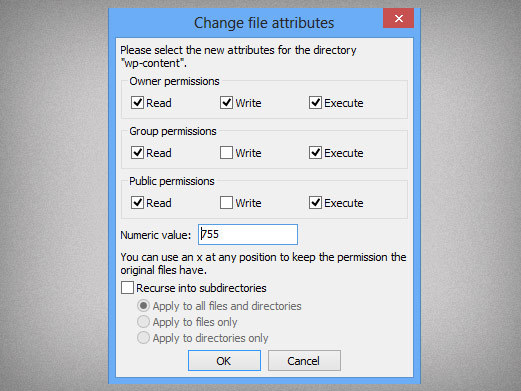
sont les suivant