
Bonjour,
J'ai commandé un serveur de stockage So You Start (https://www.soyoustart.com/fr/serveurs-stockage/).
OVH propose 5 systèmes d'exploitation pour ce serveur et j'ai choisi Debian 9.
A présent, je souhaite installer dessus ISPCONFIG.
Voici ce que j'ai tapé :
**cd /tmp**
**sudo apt-get install ca-certificates**
**sudo apt-get install ssl-cert**
**sudo wget -O installer.tgz "https://github.com/servisys/ispconfig_setup/tarball/master"**
**sudo tar zxvf installer.tgz**
**cd *ispconfig***
**sudo bash install.sh**
J'obtiens plusieurs erreurs durant l'installation :
**Updating Freshclam Antivirus Database. Please Wait... ERROR: Problem with intern al logger (UpdateLogFile = /var/log/clamav/freshclam.log).**
**ERROR: /var/log/clamav/freshclam.log is locked by another process**
**Installing Intrusion protection (Fail2Ban)...**
**Error: The following command failed: apt-get -y install fail2ban**
**Setting up fail2ban (0.9.6-2) ...**
**Created symlink /etc/systemd/system/multi-user.target.wants/fail2ban.service -> /lib/systemd/system/fail2ban.service.**
**Job for fail2ban.service failed because the control process exited with error co de.**
**See "systemctl status fail2ban.service" and "journalctl -xe" for details.**
**invoke-rc.d: initscript fail2ban, action "start" failed.**
*** fail2ban.service - Fail2Ban Service**
** Loaded: loaded (/lib/systemd/system/fail2ban.service; enabled; vendor preset: enabled)**
** Active: activating (auto-restart) (Result: exit-code) since Sun 2018-11-11 09 :22:11 CET; 47ms ago**
** Docs: man:fail2ban(1)**
** Process: 7953 ExecStart=/usr/bin/fail2ban-client -x start (code=exited, status =255)**
**Nov 11 09:22:11 ns3127423.ip-51-75-3.eu systemd[1]: Failed to start Fail2Ban …e.**
**Nov 11 09:22:11 ns3127423.ip-51-75-3.eu systemd[1]: fail2ban.service: Unit en…e.**
**Nov 11 09:22:11 ns3127423.ip-51-75-3.eu systemd[1]: fail2ban.service: Failed …'.**
**Hint: Some lines were ellipsized, use -l to show in full.**
**dpkg: error processing package fail2ban (--configure):**
** subprocess installed post-installation script returned error exit status 1**
**Errors were encountered while processing:**
** fail2ban**
**E: Sub-process /usr/bin/dpkg returned an error code (1)**
Et au final, ISPCONFIG ne fonctionne pas.
Est-ce que vous voyez quel peut être le problème ? J'ai donc lancé l'installation depuis une distribution toute neuve sur laquelle, je n'avais rien installé ou configuré.
Merci d'avance.
Serveur de stockage avec ISPCONFIG
Related questions
- Proxmox VM accès internet impossible
 55132
55132  19.11.2016 12:11
- Spam et IP bloquée
52422 12.12.2016 11:53
- il y a quelqu'un ?
51544 15.12.2025 17:01
- Mise en place de VM avec IP publique sur Proxmox 6 [RESOLU]
50413 30.04.2020 17:12
- SSD NVMe Soft Raid ou SSD SATA Hard Raid
50029 29.06.2021 23:29
- Port 25 bloqué pour spam à répétition
47190 28.02.2018 13:39
- Mise à jour PHP sur Release 3 ovh
46656 11.03.2017 17:43
- Identification carte réseau
45497 05.12.2025 10:09
- Connection smtp qui ne marche plus : connect error 10060
44904 12.04.2019 10:10
- Partition sur le disque de l'OS ESXI
44581 09.05.2017 14:33
> Error: The following command failed: apt-get -y install fail2ban
c'est fort ça.
tu es en root? ton prompt est # ? sudo est inutile
si tu n'étais pas en root
```text
su
```
maj base paquet & install manuelle
```text
apt update
apt install fail2ban
```
est -ce que ça passe?
debian est passé en 9.6 hier, ça doit aussi te proposer de faire un ugrade
pour sortir de su (éventuellement)
```text
exit
```
Merci.
Je fais le test tout à l'heure et je dis ce qu'il en est.
Je suis en "Debian GNU/Linux 9.6". Je suppose qu'OVH installe par défaut la dernière version.
Cela ne fonctionne pas. Je recopie ce que j'obtiens :
root@ns3127423:~# apt update
Ign:1 http://debian.mirrors.ovh.net/debian stretch InRelease
Get:2 http://debian.mirrors.ovh.net/debian stretch-updates InRelease [91.0 kB]
Get:3 http://security.debian.org/debian-security stretch/updates InRelease [94.3 kB]
Get:4 http://last.public.ovh.hdaas.snap.mirrors.ovh.net/debian stretch InRelease [2697 B]
Get:5 http://debian.mirrors.ovh.net/debian stretch Release [118 kB]
Fetched 306 kB in 3s (95.5 kB/s)
Reading package lists... Done
Building dependency tree
Reading state information... Done
All packages are up to date.
root@ns3127423:~# apt install fail2ban
Reading package lists... Done
Building dependency tree
Reading state information... Done
fail2ban is already the newest version (0.9.6-2).
0 upgraded, 0 newly installed, 0 to remove and 0 not upgraded.
1 not fully installed or removed.
After this operation, 0 B of additional disk space will be used.
Do you want to continue? [Y/n] y
Setting up fail2ban (0.9.6-2) ...
Job for fail2ban.service failed because the control process exited with error code.
See "systemctl status fail2ban.service" and "journalctl -xe" for details.
invoke-rc.d: initscript fail2ban, action "start" failed.
* fail2ban.service - Fail2Ban Service
Loaded: loaded (/lib/systemd/system/fail2ban.service; enabled; vendor preset: enabled)
Active: activating (auto-restart) (Result: exit-code) since Sun 2018-11-11 14:40:24 CET; 48ms ago
Docs: man:fail2ban(1)
Process: 10454 ExecStart=/usr/bin/fail2ban-client -x start (code=exited, status=255)
Nov 11 14:40:24 ns3127423.ip-51-75-3.eu systemd[1]: fail2ban.service: Unit entered failed state.
Nov 11 14:40:24 ns3127423.ip-51-75-3.eu systemd[1]: fail2ban.service: Failed with result 'exit-code'.
dpkg: error processing package fail2ban (--configure):
subprocess installed post-installation script returned error exit status 1
Errors were encountered while processing:
fail2ban
E: Sub-process /usr/bin/dpkg returned an error code (1)
Est-ce que quelqu'un aurait une idée de ce que peut être le problème ?
pas d'idées précises, tu peux essayer ces actions:
```text
dpkg --configure -a
```
si erreurs, et tant qu'il y en aura:
```text
dpkg-reconfigure fail2ban
apt-get install -f fail2ban
apt install --reinstall fail2ban
```
dernier espoir:
```text
apt purge fail2ban
apt install fail2ban
```
debian 9.6 date d'hier après midi, tu as dû lancer l'ugrade j'imagine
Je viens de réinstaller mon serveur pour avoir une configuration vierge.
Je confirme qu'OVH installe directement Debian 9.6.
Il n'y a rien à faire, impossible d'installer fail2ban.
Je recopie tout ce que j'obtiens (désolé, c'est un peu long)
login as: root
root@ns3127423.ip-51-75-3.eu's password:
Linux ns3127423.ip-51-75-3.eu 4.9.124-armada375 #1 SMP Mon Sep 3 19:18:09
Debian GNU/Linux 9.6
Linux ns3127423.ip-51-75-3.eu 4.9.124-armada375 #1 SMP Mon Sep 3 19:18:09 CEST 2 018 armv7l GNU/Linux
server : 1006101
hostname : ns3127423.ip-51-75-3.eu
eth0 IPv4 : 51.75.3.19
Last login: Sun Nov 11 15:16:28 2018 from 217.182.145.216
root@ns3127423:~# apt-get update && apt-get upgrade -y
Ign:1 http://debian.mirrors.ovh.net/debian stretch InRelease
Get:2 http://debian.mirrors.ovh.net/debian stretch-updates InRelease [91.0 kB]
Hit:3 http://security.debian.org/debian-security stretch/updates InRelease
Get:4 http://debian.mirrors.ovh.net/debian stretch Release [118 kB]
Get:6 http://last.public.ovh.hdaas.snap.mirrors.ovh.net/debian stretch InRelease [2697 B]
Fetched 212 kB in 4s (43.0 kB/s)
Reading package lists... Done
Reading package lists... Done
Building dependency tree
Reading state information... Done
Calculating upgrade... Done
0 upgraded, 0 newly installed, 0 to remove and 0 not upgraded.
root@ns3127423:~# apt install fail2ban
Reading package lists... Done
Building dependency tree
Reading state information... Done
The following additional packages will be installed:
libpython-stdlib libpython2.7-minimal libpython2.7-stdlib python python-minimal python2.7 python2.7-minimal python3-pyinotify python3-systemd whois
Suggested packages:
mailx system-log-daemon monit python-doc python-tk python2.7-doc binfmt-support python-pyinotify-doc
The following NEW packages will be installed:
fail2ban libpython-stdlib libpython2.7-minimal libpython2.7-stdlib python python-minimal python2.7 python2.7-minimal python3-pyinotify python3-systemd
whois
0 upgraded, 11 newly installed, 0 to remove and 0 not upgraded.
Need to get 4301 kB of archives.
After this operation, 16.7 MB of additional disk space will be used.
Do you want to continue? [Y/n] y
Get:1 http://debian.mirrors.ovh.net/debian stretch/main armhf libpython2.7-minimal armhf 2.7.13-2+deb9u3 [389 kB]
Get:2 http://debian.mirrors.ovh.net/debian stretch/main armhf python2.7-minimal armhf 2.7.13-2+deb9u3 [1176 kB]
Get:3 http://debian.mirrors.ovh.net/debian stretch/main armhf python-minimal armhf 2.7.13-2 [40.5 kB]
Get:4 http://debian.mirrors.ovh.net/debian stretch/main armhf libpython2.7-stdlib armhf 2.7.13-2+deb9u3 [1821 kB]
Get:5 http://debian.mirrors.ovh.net/debian stretch/main armhf python2.7 armhf 2.7.13-2+deb9u3 [285 kB]
Get:6 http://debian.mirrors.ovh.net/debian stretch/main armhf libpython-stdlib armhf 2.7.13-2 [20.0 kB]
Get:7 http://debian.mirrors.ovh.net/debian stretch/main armhf python armhf 2.7.13-2 [154 kB]
Get:8 http://debian.mirrors.ovh.net/debian stretch/main armhf fail2ban all 0.9.6-2 [288 kB]
Get:9 http://debian.mirrors.ovh.net/debian stretch/main armhf python3-pyinotify all 0.9.6-1 [26.9 kB]
Get:10 http://debian.mirrors.ovh.net/debian stretch/main armhf python3-systemd armhf 233-1 [30.9 kB]
Get:11 http://debian.mirrors.ovh.net/debian stretch/main armhf whois armhf 5.2.17~deb9u1 [70.4 kB]
Fetched 4301 kB in 7s (579 kB/s)
Selecting previously unselected package libpython2.7-minimal:armhf.
(Reading database ... 31378 files and directories currently installed.)
Preparing to unpack .../0-libpython2.7-minimal_2.7.13-2+deb9u3_armhf.deb ...
Unpacking libpython2.7-minimal:armhf (2.7.13-2+deb9u3) ...
Selecting previously unselected package python2.7-minimal.
Preparing to unpack .../1-python2.7-minimal_2.7.13-2+deb9u3_armhf.deb ...
Unpacking python2.7-minimal (2.7.13-2+deb9u3) ...
Selecting previously unselected package python-minimal.
Preparing to unpack .../2-python-minimal_2.7.13-2_armhf.deb ...
Unpacking python-minimal (2.7.13-2) ...
Selecting previously unselected package libpython2.7-stdlib:armhf.
Preparing to unpack .../3-libpython2.7-stdlib_2.7.13-2+deb9u3_armhf.deb ...
Unpacking libpython2.7-stdlib:armhf (2.7.13-2+deb9u3) ...
Selecting previously unselected package python2.7.
Preparing to unpack .../4-python2.7_2.7.13-2+deb9u3_armhf.deb ...
Unpacking python2.7 (2.7.13-2+deb9u3) ...
Selecting previously unselected package libpython-stdlib:armhf.
Preparing to unpack .../5-libpython-stdlib_2.7.13-2_armhf.deb ...
Unpacking libpython-stdlib:armhf (2.7.13-2) ...
Setting up libpython2.7-minimal:armhf (2.7.13-2+deb9u3) ...
Setting up python2.7-minimal (2.7.13-2+deb9u3) ...
Linking and byte-compiling packages for runtime python2.7...
Setting up python-minimal (2.7.13-2) ...
Selecting previously unselected package python.
(Reading database ... 32126 files and directories currently installed.)
Preparing to unpack .../python_2.7.13-2_armhf.deb ...
Unpacking python (2.7.13-2) ...
Selecting previously unselected package fail2ban.
Preparing to unpack .../fail2ban_0.9.6-2_all.deb ...
Unpacking fail2ban (0.9.6-2) ...
Selecting previously unselected package python3-pyinotify.
Preparing to unpack .../python3-pyinotify_0.9.6-1_all.deb ...
Unpacking python3-pyinotify (0.9.6-1) ...
Selecting previously unselected package python3-systemd.
Preparing to unpack .../python3-systemd_233-1_armhf.deb ...
Unpacking python3-systemd (233-1) ...
Selecting previously unselected package whois.
Preparing to unpack .../whois_5.2.17~deb9u1_armhf.deb ...
Unpacking whois (5.2.17~deb9u1) ...
Setting up fail2ban (0.9.6-2) ...
Created symlink /etc/systemd/system/multi-user.target.wants/fail2ban.service -> /lib/systemd/system/fail2ban.service.
Job for fail2ban.service failed because the control process exited with error code.
See "systemctl status fail2ban.service" and "journalctl -xe" for details.
invoke-rc.d: initscript fail2ban, action "start" failed.
* fail2ban.service - Fail2Ban Service
Loaded: loaded (/lib/systemd/system/fail2ban.service; enabled; vendor preset: enabled)
Active: activating (auto-restart) (Result: exit-code) since Sun 2018-11-11 15:20:31 CET; 50ms ago
Docs: man:fail2ban(1)
Process: 7204 ExecStart=/usr/bin/fail2ban-client -x start (code=exited, status=255)
Nov 11 15:20:31 ns3127423.ip-51-75-3.eu systemd[1]: Failed to start Fail2Ban Service.
Nov 11 15:20:31 ns3127423.ip-51-75-3.eu systemd[1]: fail2ban.service: Unit entered failed state.
Nov 11 15:20:31 ns3127423.ip-51-75-3.eu systemd[1]: fail2ban.service: Failed with result 'exit-code'.
dpkg: error processing package fail2ban (--configure):
subprocess installed post-installation script returned error exit status 1
Processing triggers for mime-support (3.60) ...
Setting up whois (5.2.17~deb9u1) ...
Setting up python3-systemd (233-1) ...
Processing triggers for systemd (232-25+deb9u6) ...
Processing triggers for man-db (2.7.6.1-2) ...
Setting up libpython2.7-stdlib:armhf (2.7.13-2+deb9u3) ...
Setting up python3-pyinotify (0.9.6-1) ...
Setting up python2.7 (2.7.13-2+deb9u3) ...
Setting up libpython-stdlib:armhf (2.7.13-2) ...
Setting up python (2.7.13-2) ...
Errors were encountered while processing:
fail2ban
E: Sub-process /usr/bin/dpkg returned an error code (1)
root@ns3127423:~# dpkg --configure -a
Setting up fail2ban (0.9.6-2) ...
Job for fail2ban.service failed because the control process exited with error code.
See "systemctl status fail2ban.service" and "journalctl -xe" for details.
invoke-rc.d: initscript fail2ban, action "start" failed.
* fail2ban.service - Fail2Ban Service
Loaded: loaded (/lib/systemd/system/fail2ban.service; enabled; vendor preset: enabled)
Active: activating (auto-restart) (Result: exit-code) since Sun 2018-11-11 15:23:53 CET; 51ms ago
Docs: man:fail2ban(1)
Process: 7468 ExecStart=/usr/bin/fail2ban-client -x start (code=exited, status=255)
Nov 11 15:23:53 ns3127423.ip-51-75-3.eu systemd[1]: fail2ban.service: Control process exited, code=exited status=255
Nov 11 15:23:53 ns3127423.ip-51-75-3.eu systemd[1]: Failed to start Fail2Ban Service.
Nov 11 15:23:53 ns3127423.ip-51-75-3.eu systemd[1]: fail2ban.service: Unit entered failed state.
Nov 11 15:23:53 ns3127423.ip-51-75-3.eu systemd[1]: fail2ban.service: Failed with result 'exit-code'.
dpkg: error processing package fail2ban (--configure):
subprocess installed post-installation script returned error exit status 1
Errors were encountered while processing:
fail2ban
root@ns3127423:~# dpkg-reconfigure fail2ban
/usr/sbin/dpkg-reconfigure: fail2ban is broken or not fully installed
root@ns3127423:~# apt-get install -f fail2ban
Reading package lists... Done
Building dependency tree
Reading state information... Done
fail2ban is already the newest version (0.9.6-2).
0 upgraded, 0 newly installed, 0 to remove and 0 not upgraded.
1 not fully installed or removed.
After this operation, 0 B of additional disk space will be used.
Do you want to continue? [Y/n] y
Setting up fail2ban (0.9.6-2) ...
Job for fail2ban.service failed because the control process exited with error code.
See "systemctl status fail2ban.service" and "journalctl -xe" for details.
invoke-rc.d: initscript fail2ban, action "start" failed.
* fail2ban.service - Fail2Ban Service
Loaded: loaded (/lib/systemd/system/fail2ban.service; enabled; vendor preset: enabled)
Active: activating (auto-restart) (Result: exit-code) since Sun 2018-11-11 15:24:31 CET; 52ms ago
Docs: man:fail2ban(1)
Process: 7567 ExecStart=/usr/bin/fail2ban-client -x start (code=exited, status=255)
Nov 11 15:24:31 ns3127423.ip-51-75-3.eu systemd[1]: fail2ban.service: Control process exited, code=exited status=255
Nov 11 15:24:31 ns3127423.ip-51-75-3.eu systemd[1]: Failed to start Fail2Ban Service.
Nov 11 15:24:31 ns3127423.ip-51-75-3.eu systemd[1]: fail2ban.service: Unit entered failed state.
Nov 11 15:24:31 ns3127423.ip-51-75-3.eu systemd[1]: fail2ban.service: Failed with result 'exit-code'.
dpkg: error processing package fail2ban (--configure):
subprocess installed post-installation script returned error exit status 1
Errors were encountered while processing:
fail2ban
E: Sub-process /usr/bin/dpkg returned an error code (1)
root@ns3127423:~# apt install --reinstall fail2ban
Reading package lists... Done
Building dependency tree
Reading state information... Done
0 upgraded, 0 newly installed, 1 reinstalled, 0 to remove and 0 not upgraded.
1 not fully installed or removed.
After this operation, 0 B of additional disk space will be used.
E: Internal Error, No file name for fail2ban:armhf
root@ns3127423:~# dpkg-reconfigure fail2ban
/usr/sbin/dpkg-reconfigure: fail2ban is broken or not fully installed
root@ns3127423:~# apt-get install -f fail2ban
Reading package lists... Done
Building dependency tree
Reading state information... Done
fail2ban is already the newest version (0.9.6-2).
0 upgraded, 0 newly installed, 0 to remove and 0 not upgraded.
1 not fully installed or removed.
After this operation, 0 B of additional disk space will be used.
Do you want to continue? [Y/n] y
Setting up fail2ban (0.9.6-2) ...
Job for fail2ban.service failed because the control process exited with error code.
See "systemctl status fail2ban.service" and "journalctl -xe" for details.
invoke-rc.d: initscript fail2ban, action "start" failed.
* fail2ban.service - Fail2Ban Service
Loaded: loaded (/lib/systemd/system/fail2ban.service; enabled; vendor preset: enabled)
Active: activating (auto-restart) (Result: exit-code) since Sun 2018-11-11 15:25:15 CET; 45ms ago
Docs: man:fail2ban(1)
Process: 7668 ExecStart=/usr/bin/fail2ban-client -x start (code=exited, status=255)
dpkg: error processing package fail2ban (--configure):
subprocess installed post-installation script returned error exit status 1
Errors were encountered while processing:
fail2ban
E: Sub-process /usr/bin/dpkg returned an error code (1)
root@ns3127423:~# apt install --reinstall fail2ban
Reading package lists... Done
Building dependency tree
Reading state information... Done
0 upgraded, 0 newly installed, 1 reinstalled, 0 to remove and 0 not upgraded.
1 not fully installed or removed.
After this operation, 0 B of additional disk space will be used.
E: Internal Error, No file name for fail2ban:armhf
root@ns3127423:~# apt purge fail2ban
Reading package lists... Done
Building dependency tree
Reading state information... Done
The following packages were automatically installed and are no longer required:
libpython-stdlib libpython2.7-minimal libpython2.7-stdlib python python-minimal python2.7 python2.7-minimal python3-pyinotify python3-systemd
Use 'apt autoremove' to remove them.
The following packages will be REMOVED:
fail2ban*
0 upgraded, 0 newly installed, 1 to remove and 0 not upgraded.
1 not fully installed or removed.
After this operation, 1321 kB disk space will be freed.
Do you want to continue? [Y/n] y
(Reading database ... 32633 files and directories currently installed.)
Removing fail2ban (0.9.6-2) ...
Processing triggers for man-db (2.7.6.1-2) ...
(Reading database ... 32387 files and directories currently installed.)
Purging configuration files for fail2ban (0.9.6-2) ...
Processing triggers for systemd (232-25+deb9u6) ...
root@ns3127423:~# apt install fail2ban
Reading package lists... Done
Building dependency tree
Reading state information... Done
Suggested packages:
mailx system-log-daemon monit
The following NEW packages will be installed:
fail2ban
0 upgraded, 1 newly installed, 0 to remove and 0 not upgraded.
Need to get 0 B/288 kB of archives.
After this operation, 1321 kB of additional disk space will be used.
Selecting previously unselected package fail2ban.
(Reading database ... 32227 files and directories currently installed.)
Preparing to unpack .../fail2ban_0.9.6-2_all.deb ...
Unpacking fail2ban (0.9.6-2) ...
Setting up fail2ban (0.9.6-2) ...
Created symlink /etc/systemd/system/multi-user.target.wants/fail2ban.service -> /lib/systemd/system/fail2ban.service.
Job for fail2ban.service failed because the control process exited with error code.
See "systemctl status fail2ban.service" and "journalctl -xe" for details.
invoke-rc.d: initscript fail2ban, action "start" failed.
* fail2ban.service - Fail2Ban Service
Loaded: loaded (/lib/systemd/system/fail2ban.service; enabled; vendor preset: enabled)
Active: activating (auto-restart) (Result: exit-code) since Sun 2018-11-11 15:26:23 CET; 50ms ago
Docs: man:fail2ban(1)
Process: 8051 ExecStart=/usr/bin/fail2ban-client -x start (code=exited, status=255)
Nov 11 15:26:23 ns3127423.ip-51-75-3.eu systemd[1]: fail2ban.service: Unit entered failed state.
Nov 11 15:26:23 ns3127423.ip-51-75-3.eu systemd[1]: fail2ban.service: Failed with result 'exit-code'.
dpkg: error processing package fail2ban (--configure):
subprocess installed post-installation script returned error exit status 1
Processing triggers for systemd (232-25+deb9u6) ...
Processing triggers for man-db (2.7.6.1-2) ...
Errors were encountered while processing:
fail2ban
E: Sub-process /usr/bin/dpkg returned an error code (1)
root@ns3127423:~#
> Je confirme qu'OVH installe directement Debian 9.6.
aujourd'hui oui ;)
tu peux retourner le résultat:
```text
grep -Ersv '^#|^$' /etc/apt/sources.list /etc/apt/sources.list.d/*.list /etc/apt/sources.list.d/*.sources
```
Oui, j'ai réinstallé aujourd'hui le serveur.
root@ns3127423:~# grep -Ersv '^#|^$' /etc/apt/sources.list /etc/apt/sources.list.d/*.list /etc/apt/sources.list.d/*.sources
/etc/apt/sources.list:deb http://debian.mirrors.ovh.net/debian/ stretch main
/etc/apt/sources.list:deb-src http://debian.mirrors.ovh.net/debian/ stretch main
/etc/apt/sources.list:deb http://security.debian.org/debian-security stretch/updates main
/etc/apt/sources.list:deb-src http://security.debian.org/debian-security stretch/updates main
/etc/apt/sources.list:deb http://debian.mirrors.ovh.net/debian/ stretch-updates main
/etc/apt/sources.list:deb-src http://debian.mirrors.ovh.net/debian/ stretch-updates main
/etc/apt/sources.list.d/ovh.list:deb http://last.public.ovh.hdaas.snap.mirrors.ovh.net/debian/ stretch main
pour info:
`apt update`
tu ne le fais, quand tu installes, qu'une fois par jour, c'est suffisant
je teste sur des stables, pour l'instant je reproduis pas l'erreur
Ma version est la suivante : "Debian 9 Armhf "Stretch" (32bits)"
Si tu veux, je peux à nouveau réinitialiser le serveur et t'envoyer un mail avec l'identifiant root pour que tu puisses tester directement sur mon serveur. Cela sera peut être plus simple pour toi.
```text j'ai testé vur VPS et public cloud et pc local, avant ou après upgrade:
pas de de reproduction bug, même avec tes sources
ton architecture me pose question, mais sur un raspi, pas de souci non plus
le seul truc éventuel si tu veux esssayer, c'est des dépots officiels.
si tu veux tester, remplace dans ton fichier sources
`nano /etc/apt/sources.list`
```text
deb http://deb.debian.org/debian/ stretch main contrib non-free
deb http://deb.debian.org/debian/ stretch-updates main contrib non-free
deb http://deb.debian.org/debian-security/ stretch/updates main contrib non-free
#deb-src http://debian.mirrors.ovh.net/debian/ stretch main main contrib non-free
#deb-src http://security.debian.org/debian-security stretch/updates main main contrib non-free
#deb-src http://debian.mirrors.ovh.net/debian/ stretch-updates main main contrib non-free
/etc/apt/sources.list.d/ovh.list:deb http://last.public.ovh.hdaas.snap.mirrors.ovh.net/debian/ stretch main
```
je t'envoie un message privé ```
Capture d'écran montrant les distributions que je peux installer.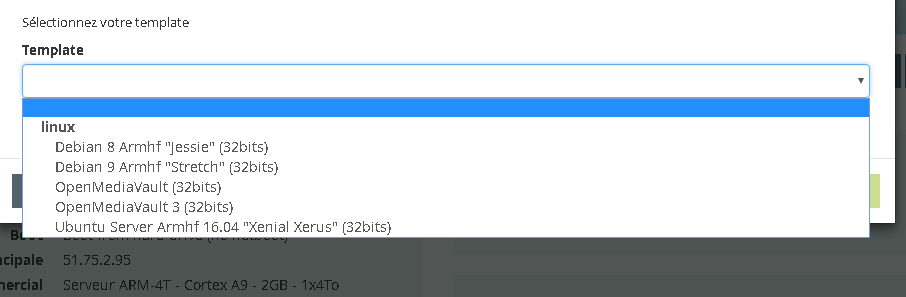
```text quelques tests de base sans réussites, quelques soit les dépots:
```text
dpkg-reconfigure fail2ban
/usr/sbin/dpkg-reconfigure: fail2ban is broken or not fully installed
apt-get install -f fail2ban
Errors were encountered while processing: fail2ban
journalctl -xe | grep fail2ban
-- Subject: Unit fail2ban.service has begun start-up
-- Unit fail2ban.service has begun starting up.
ERROR No file(s) found for glob /var/log/auth.log
ERROR Failed during configuration: Have not found any log file for sshd jail
fail2ban.service: Control process exited, code=exited status=255
```
bug récurrent, rare, depuis 2016 chez fail2ban, mais un collègue sur une fraîche install n'a pas réussi à le reproduire
```text
touch /var/log/auth.log
apt-get install -f fail2ban
```
c'est ok, service démarré
ispconfig :
```text
apt-get install ca-certificates
apt-get install ssl-cert
wget -O installer.tgz "https://github.com/servisys/ispconfig_setup/tarball/master"
tar zxvf installer.tgz
cd servisys-ispconfig_setup-09539c9/
chmod +x install.sh
./install.sh
cd -
rm installer.tgz
rm -fr servisys-ispconfig_setup-09539c9/
``` ```
Merci énormément pour tout ce que tu as fait !
J'espère que ce sujet pourra en aider d'autres.