
Bonjour tout le monde,
auriez-vous des astuces ou des guides à partager pour optimiser le moteur PHP ?
je suis sous le 7.2.12.
Serveurs Privés Virtuels (VPS) - Optimiser moteur PHP sous plesk
Related questions
- Perte de mot de passe
 51871
51871  26.05.2023 13:36
- Comment configurer/utiliser un SMTP depuis un VPS ?
50011 07.10.2019 10:49
- Je connais que le mutu et besoin de node js
49506 14.04.2017 13:34
- Qu'est-ce vcore?
48741 06.01.2017 19:20
- Envoi Email via SMTP (port 587) sur VPS Pro1
47703 27.01.2017 10:02
- [résolu] Serveur Mysql - hôte inconnu
45142 19.01.2017 16:21
- Délai de livraison VPS
45068 11.07.2018 15:15
- Mon VPS à Timed Out
45039 15.03.2017 22:50
- Problème avec statisitique Plesk
41942 29.03.2017 07:44
- Accès externe base de données
41247 18.07.2018 10:29
Bonjour,
En soit c'est pas le moteur PHP qu'il faut vouloir optimiser mais le site/code du site.
Car côté PHP à part utiliser les dernières versions, activer et optimiser OPCache et utiliser php-fpm (qui va pas influencer optimiser la vitesse de rendu PHP mais optimiser l'utilisation des ressources).
Exemple : le site fait 2 curl dans un script, le moteur PHP aura beau être super optimisé au max, ce sont les appels curl qui vont dicter les performances du script et ce qui lui est rattaché.
Cordialement, janus57
Merci pour ce rappel.
Il est grand temps que les devs comprennent que l'optimisation c'est leur boulot pas celui du sysadmin.
Le sysadmin peut effectivement aider en faisant quelques arrangements, mais le coeur du problème c'est la façon de coder, encore et toujours...
bonsoir tout le monde,
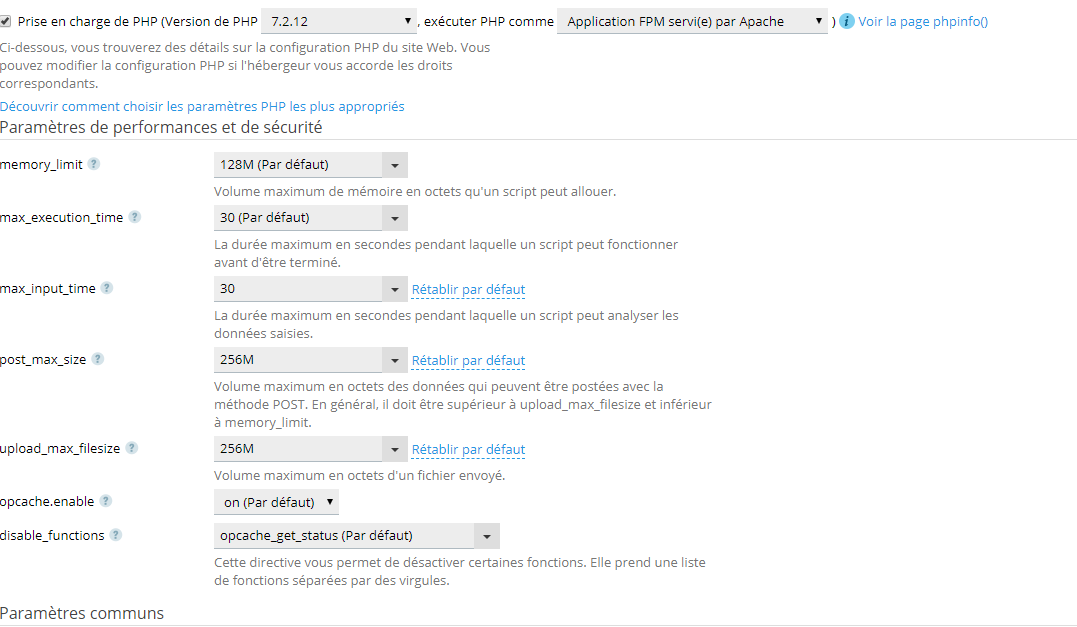
merci de vos réponses, du coup cal convient bien ?
Bonjour,
sur cette image 0 paramètres d'optimisation de OPCache, c'est juste la config générale de PHP
Cordialement, janus57
tu peux regarder un phpinfo ovh, plus cool sur certaines valeurs:
http://cluster015.ovh.net/infos/
pour opcache, si tu veux mettre les mains dans le cambouis:
https://1tech.fr/blog/opcache-configuration-et-fonctionnement/tech.fr/blog/opcache-configuration-et-fonctionnement/
Bonjour tout le monde,
alor je suis allé voir dans le php.ini est en effet tout les module opcache été pas en fonctionnement il avais tous un ";" devant les modules.
```
[opcache]
; Determines if Zend OPCache is enabled
opcache.enable=1
; Determines if Zend OPCache is enabled for the CLI version of PHP
opcache.enable_cli=0
; The OPcache shared memory storage size.
opcache.memory_consumption=512
; The amount of memory for interned strings in Mbytes.
opcache.interned_strings_buffer=8
; The maximum number of keys (scripts) in the OPcache hash table.
; Only numbers between 200 and 1000000 are allowed.
opcache.max_accelerated_files=32000
; The maximum percentage of "wasted" memory until a restart is scheduled.
opcache.max_wasted_percentage=5
; When this directive is enabled, the OPcache appends the current working
; directory to the script key, thus eliminating possible collisions between
; files with the same name (basename). Disabling the directive improves
; performance, but may break existing applications.
opcache.use_cwd=1
; When disabled, you must reset the OPcache manually or restart the
; webserver for changes to the filesystem to take effect.
opcache.validate_timestamps=1
; How often (in seconds) to check file timestamps for changes to the shared
; memory storage allocation. ("1" means validate once per second, but only
; once per request. "0" means always validate)
opcache.revalidate_freq=2
; Enables or disables file search in include_path optimization
opcache.revalidate_path=0
; If disabled, all PHPDoc comments are dropped from the code to reduce the
; size of the optimized code.
opcache.save_comments=1
; Allow file existence override (file_exists, etc.) performance feature.
opcache.enable_file_override=0
; A bitmask, where each bit enables or disables the appropriate OPcache
; passes
opcache.optimization_level=0xffffffff
opcache.inherited_hack=1
opcache.dups_fix=0
; The location of the OPcache blacklist file (wildcards allowed).
; Each OPcache blacklist file is a text file that holds the names of files
; that should not be accelerated. The file format is to add each filename
; to a new line. The filename may be a full path or just a file prefix
; (i.e., /var/www/x blacklists all the files and directories in /var/www
; that start with 'x'). Line starting with a ; are ignored (comments).
opcache.blacklist_filename=
; Allows exclusion of large files from being cached. By default all files
; are cached.
opcache.max_file_size=0
; Check the cache checksum each N requests.
; The default value of "0" means that the checks are disabled.
opcache.consistency_checks=0
; How long to wait (in seconds) for a scheduled restart to begin if the cache
; is not being accessed.
opcache.force_restart_timeout=180
; OPcache error_log file name. Empty string assumes "stderr".
opcache.error_log=
; All OPcache errors go to the Web server log.
; By default, only fatal errors (level 0) or errors (level 1) are logged.
; You can also enable warnings (level 2), info messages (level 3) or
; debug messages (level 4).
opcache.log_verbosity_level=1
; Preferred Shared Memory back-end. Leave empty and let the system decide.
opcache.preferred_memory_model=
; Protect the shared memory from unexpected writing during script execution.
; Useful for internal debugging only.
opcache.protect_memory=0
; Allows calling OPcache API functions only from PHP scripts which path is
; started from specified string. The default "" means no restriction
opcache.restrict_api=
; Mapping base of shared memory segments (for Windows only). All the PHP
; processes have to map shared memory into the same address space. This
; directive allows to manually fix the "Unable to reattach to base address"
; errors.
opcache.mmap_base=
; Enables and sets the second level cache directory.
; It should improve performance when SHM memory is full, at server restart or
; SHM reset. The default "" disables file based caching.
opcache.file_cache=
; Enables or disables opcode caching in shared memory.
opcache.file_cache_only=0
; Enables or disables checksum validation when script loaded from file cache.
opcache.file_cache_consistency_checks=1
; Implies opcache.file_cache_only=1 for a certain process that failed to
; reattach to the shared memory (for Windows only). Explicitly enabled file
; cache is required.
opcache.file_cache_fallback=1
; Enables or disables copying of PHP code (text segment) into HUGE PAGES.
; This should improve performance, but requires appropriate OS configuration.
opcache.huge_code_pages=0
; Validate cached file permissions.
opcache.validate_permission=0
; Prevent name collisions in chroot'ed environment.
opcache.validate_root=0
; If specified, it produces opcode dumps for debugging different stages of
; optimizations.
opcache.opt_debug_level=0
```
Bonjour,
Cela ne veux pas dire pour autant que c'est désactivé car ici ce sont des paramètres et non des modules, juste que cela utilise les valeurs par défauts qui ne sont peut être pas optimisé à 100% pour le(s) site(s).
Cordialement, janus57
bonjour
as-tu un guide sur l'optimisation du opcache ?
Bonjour,
Non car cela va dépendre du/des sites qui utiliseront OPCache ainsi que la configuration du VPS.
Cordialement, janus57
Je n'ai qu'un site sur le VPS pour le moment.
Il faudrait que j'affine les paramètres dans le php.ini alors !