
Hello,
Since yesterday, I'm trying to connect to my server via ssh, sftp, but login fail.
I decided to reboot the server via my OVH control panel before taking further steps. And it's been hours now after reboot and I still cannot connect to the server via SSH and all sites are down.
A community help will be highly appreciated.
Cannot access to my OVH VPS: SSH and SFTP timeout
Related questions
- Quelle est la plage de port FTP mode passif ?
 27757
27757  08.12.2017 22:08
- Identifiants ftp
25307 16.05.2017 10:41
- FTP: Impossible de récupérer le contenu du dossier
16586 26.02.2017 15:48
- Connection Ftp impossible
16493 24.04.2019 16:10
- Connexion FTP Filezilla - 421 Home directory not available - aborting
14601 19.04.2017 09:56
- Parametrage ligne sip sur softphone
14563 12.07.2019 08:19
- Envoyer un fichier .xml via cURL vers un sFTP OVH
14177 11.02.2021 14:13
- Répertoire SFTP avec clé publique/privée
12398 23.11.2018 07:36
- Impossible de me connecter en ftp à mon serveur
12105 17.07.2018 14:38
It sounds like your server has a problem. Don't you have a KVM option to connect to it directly from the OVH manager?
If not you can reboot it in rescue mode. The server will boot from the network (not from its local drive) and you'll be then be able to mount the local drive and inspect what's going on.
Hi @Sylvain ,
I just reboot on rescue mode, but still cannot access using ssh :(
Operation timed out
That's weird. To SSH into your server in rescue mode you're supposed to receive a temporary password by email (if you have configured a public key in the manager you may able to use it) and I think it uses the default SSH port (in case you changed it).
Hi @Sylvain
Finally I could connect to my server, could you please help me to setup iptables, I think that firewall allow only http and https :/
Why do you think it's an iptables related problem?
If it is and a reboot didn't fix it, it probably means that you use the `iptables-persistent` package (if your server runs under Debian or Ubuntu) and that iptables rules are read from a file at startup (usually located under `/etc/iptables/rules.v4`.).
In that case, you need to find your server's root partition (you can use `lsblk` for that). On a VPS in rescue mode I think the partition is usually already mounted under `/mnt/something`.
You then then need to edit the iptables rules file as required, you can paste its content here first if you're not sure.
Actualy, I did mount /dev/md2 to /mnt and run cmd chroot /mnt
/etc/iptables/rules.v4 is empty.
What is the recommended secure config for iptables ?
Then it was probably not an iptables problem in the beginning because rebooting the server would have solved it (iptables rules would have been cleared unless you use another way to configure them at startup, such as a custom script).
A secure configuration for iptables would at least only accept incoming traffic on ports used by the services you run and responses to outgoing traffic from your server. You can also limit authorized ports for outgoing traffic.
But you should first check the logs of your server to understand what prevented you to login through SSH in the first place.
I mean that I could finally acces using rescue mode, but still cannot access via ssh Boot from hard drive
It's not hard to believe since you don't seem to have persistent iptables rules defined.
Let's go back to the beginning, we may have gone too fast. It seems you suddenly lost the SSH access to your server: was it after a specific event (like a software upgrade, a change of iptables rules…)? Is it limited to SSH/SFTP (are the other services running on your server OK)?
what is the domain name?
what about this thread? https://community.ovhcloud.com/community/fr/erreur-503-suite-a-la-resiliation-ssl-gateway?id=community_question&sys_id=09a2b548f5d246d02d4c5f7a9ab3612d
my domain name: royalmakeup.com
This thread https://community.ovhcloud.com/community/fr/erreur-503-suite-a-la-resiliation-ssl-gateway?id=community_question&sys_id=09a2b548f5d246d02d4c5f7a9ab3612d is not yet closed :(
It was after software upgrade and trying to setup openssl to use https; http and https are reachable.
but SSH/SFTP no access :/
what host do you use with ssh?
a host like ?: `ssh login@vps123456.ovh.net`
Can you tell us exactly and precisely what you did? Upgrading software and setting up TLS shouldn't "break" SSH.
By the way, your domain is responding for HTTP (with the default nginx index page though) and for HTTPS it seems the port isn't closed but nothing is listening to it.
And what with the OpenSSL Gateway? You were using one but terminated it? If yes, did SSH stop working at the same time?
2 last questions:
* What's the IP of your VPS reported in the OVH manager?
* Don't you have a KVM access to your VPS (see https://docs.ovh.com/gb/en/vps/use-kvm-for-vps/ here)?
ssh root@37.187.248.13
```text ```text
dig +short royalmakeup.com
37.187.248.13
curl --head royalmakeup.com
HTTP/1.1 200 OK
Server: nginx/1.4.6 (Ubuntu)
```
this ip is for the ssl gateway (nginx server)?
use the vps ip or a host like vps123456.ovh.net (Ovh gave you this host) ```
And what with the OpenSSL Gateway? You were using one but terminated it? If yes, did SSH stop working at the same time?
Yes, but SSH didn't stop working at the same time, I think did deny all something I found in internet,
by the way my website is deployement in apache2, I don't know how it has been switched to nginx :/
What's the IP of your VPS reported in the OVH manager?
ssh root@37.187.248.13
Don't you have a KVM access to your VPS (see here)?
No
this ip is for the ssl gateway (nginx server)? No it's my dedicated server ip
use the vps ip or a host like vps123456.ovh.net (Ovh gave you this host)
ns333830.ip-37-187-248.eu ?
After applying this config https://www.digitalocean.com/community/tutorials/how-to-install-the-apache-web-server-on-ubuntu-16-04
I couldnt use ssh anymore
ok, I did not see the **dedicated** server
I think the ssl gw is the key of problem, but sorry I can not help
Finally I could solve the issue, could you please help me to switch from nginx to apache2 ?
Finally I could fix the issue, could you please help me to setup a secure ssl, tuto maybe ?
As SSL gateway still suspended, my website is not secure using only http :/
perhaps with:
https://www.digitalocean.com/community/tutorials/how-to-secure-apache-with-let-s-encrypt-on-ubuntu-16-04
```text ```text
Non critique
Nom DNS: royalmakeup.com
```
you have to add www.royalmakeup.com ```
Done I've got certification files, but when I acces to my website using https https://www.royalmakeup.com empty :/
no, see my previous message, you have only the certificate for root domain
IMPORTANT NOTES:
- The following errors were reported by the server:
Domain: www.royalmekup.com
Type: None
Detail: DNS problem: NXDOMAIN looking up A for www.royalmekup.com
```text ```text
host $(dig +short www.royalmakeup.com @dns12.ovh.net)
... pointer ns333830.ip-37-187-248.eu.
host $(dig +short royalmakeup.com @dns12.ovh.net)
... pointer ns333830.ip-37-187-248.eu.
```
all is ok
```text
host $(dig +short www.royalmakeup.com @1.1.1.1)
... pointer ns333830.ip-37-187-248.eu.
host $(dig +short royalmakeup.com @1.1.1.1)
... pointer ns333830.ip-37-187-248.eu.
``` ```
still getting the same error
Detail: DNS problem: NXDOMAIN looking up A
can you edit `sudo nano /etc/resolv.conf` and tests with
```text
nameserver 1.1.1.1
nameserver 208.67.222.222
```
comments the other lines
Bonjour,
c'est royalmakup avec un "a" , car tu as mis royalmekup
Cordialement,
Boris.
Bonjour,
Domain: wwww.royalmakeup.com
Type: None
Detail: DNS problem: NXDOMAIN looking up A for wwww.royalmakeup.com
Merci
I just tried , but no success :(
Bonjour,
Normal, aucune entrée DNS.
Note : wwww.royalmakeup.com != www.royalmakeup.com
Donc bien faire attention au copier/coller ou ce que vous écrivez.
Cordialement, janus57
Bonjour,
Merci @janus57, ça marche maintenant.
par contre le serveur j'ai un autre problème : ERR_TOO_MANY_REDIRECTS
PS: je n'ai pas une redirection ipv6
Cordialement
Bonjour @janus57,
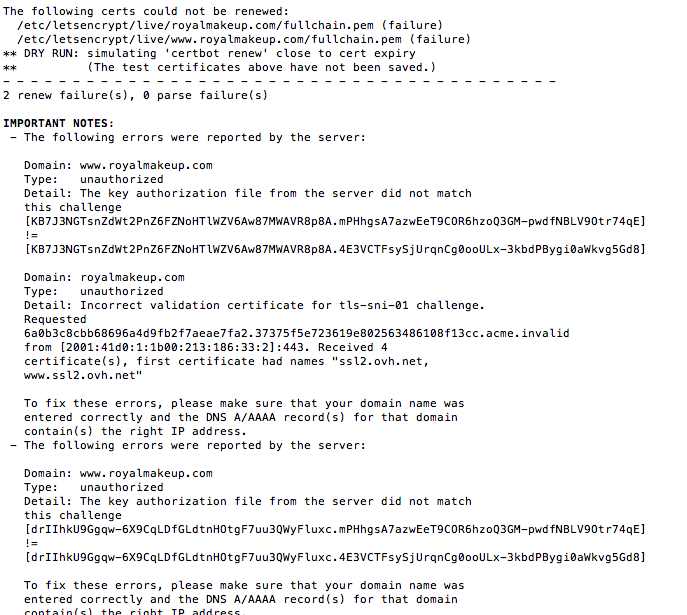
Je viens d'excuter la commande : sudo certbot renew --dry-run
J'ai reçu ce message d'erreur:
Merci !
Cordialement,
Bonjour,
vous avez mis une IPv6 d'un mutu (2001:41d0:1:1b00:213:186:33:2 == cluster002), donc normale que ça plante.
Cordialement, janus57
Bonjour,
Je n'arrive pas à trouver IPv6 du serveur dédié :/
Cordialement,
Bonjour,
Sur un dédié l'information est disponible sur le manager et sur le serveur vu qu'il sont livré IPv6 "activé" (déjà configuré et utilisable en fin d'installation).
Après si c'est un VPS là c'est de l'IPv6 ready (donc à l'administrateur de la configurer/activer).
Cordialement, janus57
pour commencer AbdelkrimK , tu pourrais supprimer ces pointeurs AAAA et tant que tout n'est pas stabilisé, baisser le TTL.
là tu as 1 jour, donc une propagation de ta zoneDNS en 2 jours maxi.
```txt
dig +nocmd royalmakeup.com AAAA +noall +answer @dns12.ovh.net
royalmakeup.com. 86400 IN AAAA 2001:41d0:1:1b00:213:186:33:2
dig +short -x 2001:41d0:1:1b00:213:186:33:2 -> cluster002.ovh.net.
dig +nocmd www.royalmakeup.com AAAA +noall +answer @dns12.ovh.net
www.royalmakeup.com. 86400 IN AAAA 2001:41d0:1:1b00:213:186:33:2
dig +short -x 2001:41d0:1:1b00:213:186:33:2 -> cluster002.ovh.net.
```
bonsoir.
j'ai fait quelque commande :
sudo systemctl stop firewalld
sudo systemctl disable firewalld
sudo systemctl mask --now firewalld
sudo yum install iptables-services
sudo systemctl start iptables
sudo systemctl start ip6tables
sudo systemctl enable iptables
sudo systemctl enable ip6tables
sudo systemctl status iptables
sudo systemctl status ip6tables
sudo iptables -nvL
sudo ip6tables -nvL
et j'ai fait reboot
maintenant mon vps est fermé et donne un erreur de connection timeout
je ne peut pas accédé aux plesc et ssh
s'il vous plais quelqu'un peut m'aider c tres urgent
doublon avec https://community.ovhcloud.com/community/fr/vps-err-connection-timeout?id=community_question&sys_id=8824790cfd9e8e902d4c483e6acd51a7