
Bonjour
Je n'arrive pas a me connecter avec openvpn client sur pfsense 2.4.4 au serveur VPS avec openvpn serveur d'installer dessus auriez vous des conseil de configuration a me donner ou un tuto qui traînerais quelque part
Je vous remercie par avance
Cordialement
Laurent Devoulon
Serveurs Privés Virtuels (VPS) - Pfsense OPENVPN Client, 4G, VPS OPENVPNSERVER
Related questions
- Perte de mot de passe
 49454
49454  26.05.2023 13:36
- Comment configurer/utiliser un SMTP depuis un VPS ?
47872 07.10.2019 10:49
- Je connais que le mutu et besoin de node js
47532 14.04.2017 13:34
- Qu'est-ce vcore?
46630 06.01.2017 19:20
- Envoi Email via SMTP (port 587) sur VPS Pro1
45551 27.01.2017 10:02
- [résolu] Serveur Mysql - hôte inconnu
43197 19.01.2017 16:21
- Mon VPS à Timed Out
42996 15.03.2017 22:50
- Délai de livraison VPS
42578 11.07.2018 15:15
- Problème avec statisitique Plesk
40016 29.03.2017 07:44
- Accès externe base de données
39369 18.07.2018 10:29
ça ? : https://korben.info/installer-openvpn.html
Non ce n'est pas ça que je veux c'est de faire passer tout mon lan sur la 4g via pfsense et pouvoir prendre la main depuis l’extérieur sur mes serveurs et autre a l’intérieur de mon lan.
Mais je n'arrive déjà pas a m'y connecter depuis l’intérieur en utilisant pfsense, par contre a partir d'un pc en installant le client openvpn ça fonctionne parfaitement mais il n'y a que ce pc qui est connecter au vpn et pas mon lan.
ça doit être un problème de routage.
openvpn n'est peut être pas le plus adapté pour relier des réseaux, perso j'utilise tinc pour ce genre de boulot.
Mais l'idée c'est de pouvoir te connecter depuis l'extérieur à ton lan c'est ça ?
Il faudrait un descriptif de l'infra. Les différents plan IP, les routes, etc... De là ce sera plus simple pour expliquer ce qui doit être fait.
Alors c'est assez simple je n'ai qu'un vlan pour le moment
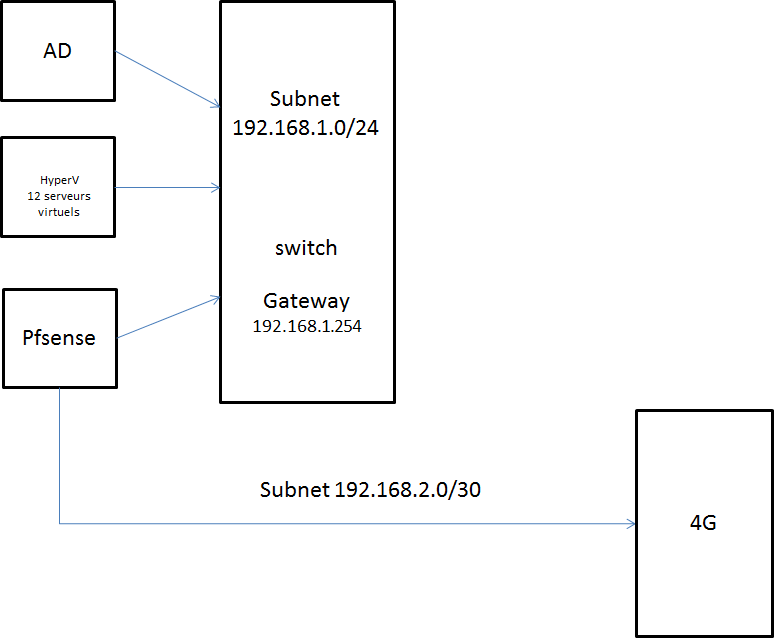
n'ayant pas visio sous la main voici le schema
on ne peux faire plus simple pour le moment ca fonctionne j'outre passe les firewall interne pour les differents point d'acces wifi et la DMZ pour OWA
pour le momentg ce que je voudrais c'est deja faire causer pfsense openvepn client avec le openvpn serveur qui est sur le vps ovh mais impossible
Ce ne serait pas un problème de filtrage de port via la 4G ?
As tu vérifié que le port est bien ouvert via nmap ?
C'est quoi le soucis exactement entre le client et le serveur openvpn ?
Non ca ne vient pas d'un probleme de port coté 4G car lorsque tu installe le client openvpn sur un pc et que tu lance la connection avec le certificat fourni ca se connecte tres bien et j'arrive a surfer normalement sans perte de debit.
c'est vraiment un probleme avec Pfsense
Voici les logs de pfsense inconprehensible
j'ai essayer avec les deux ports TCP 443 et UDP 1194
Feb 4 10:25:38 openvpn 72483 TCP/UDP: Preserving recently used remote address: [AF_INET]51.77.231.86:443
Feb 4 10:25:38 openvpn 72483 Socket Buffers: R=[65228->65228] S=[65228->65228]
Feb 4 10:25:38 openvpn 72483 Attempting to establish TCP connection with [AF_INET]51.77.231.86:443 [nonblock]
Feb 4 10:25:39 openvpn 72483 TCP connection established with [AF_INET]51.77.231.86:443
Feb 4 10:25:39 openvpn 72483 TCPv4_CLIENT link local (bound): [AF_INET]192.168.2.5:0
Feb 4 10:25:39 openvpn 72483 TCPv4_CLIENT link remote: [AF_INET]51.77.231.86:443
Feb 4 10:25:39 openvpn 72483 Connection reset, restarting [0]
Feb 4 10:25:39 openvpn 72483 SIGUSR1[soft,connection-reset] received, process restarting
Feb 4 10:25:39 openvpn 72483 Restart pause, 40 second(s)
Feb 4 10:26:19 openvpn 72483 NOTE: the current --script-security setting may allow this configuration to call user-defined scripts
Feb 4 10:26:19 openvpn 72483 TCP/UDP: Preserving recently used remote address: [AF_INET]51.77.231.86:443
Feb 4 10:26:19 openvpn 72483 Socket Buffers: R=[65228->65228] S=[65228->65228]
Feb 4 10:26:19 openvpn 72483 Attempting to establish TCP connection with [AF_INET]51.77.231.86:443 [nonblock]
Feb 4 10:26:20 openvpn 72483 TCP connection established with [AF_INET]51.77.231.86:443
Feb 4 10:26:20 openvpn 72483 TCPv4_CLIENT link local (bound): [AF_INET]192.168.2.5:0
Feb 4 10:26:20 openvpn 72483 TCPv4_CLIENT link remote: [AF_INET]51.77.231.86:443
Feb 4 10:26:20 openvpn 72483 Connection reset, restarting [0]
Feb 4 10:26:20 openvpn 72483 SIGUSR1[soft,connection-reset] received, process restarting
Feb 4 10:26:20 openvpn 72483 Restart pause, 80 second(s)
Feb 4 10:27:40 openvpn 72483 NOTE: the current --script-security setting may allow this configuration to call user-defined scripts
Feb 4 10:27:40 openvpn 72483 TCP/UDP: Preserving recently used remote address: [AF_INET]51.77.231.86:443
Feb 4 10:27:40 openvpn 72483 Socket Buffers: R=[65228->65228] S=[65228->65228]
Feb 4 10:27:40 openvpn 72483 Attempting to establish TCP connection with [AF_INET]51.77.231.86:443 [nonblock]
Feb 4 10:27:41 openvpn 72483 TCP connection established with [AF_INET]51.77.231.86:443
Feb 4 10:27:41 openvpn 72483 TCPv4_CLIENT link local (bound): [AF_INET]192.168.2.5:0
Feb 4 10:27:41 openvpn 72483 TCPv4_CLIENT link remote: [AF_INET]51.77.231.86:443
Feb 4 10:27:41 openvpn 72483 Connection reset, restarting [0]
Feb 4 10:27:41 openvpn 72483 SIGUSR1[soft,connection-reset] received, process restarting
Feb 4 10:27:41 openvpn 72483 Restart pause, 160 second(s)
Feb 4 10:30:21 openvpn 72483 NOTE: the current --script-security setting may allow this configuration to call user-defined scripts
Feb 4 10:30:21 openvpn 72483 TCP/UDP: Preserving recently used remote address: [AF_INET]51.77.231.86:443
Feb 4 10:30:21 openvpn 72483 Socket Buffers: R=[65228->65228] S=[65228->65228]
Feb 4 10:30:21 openvpn 72483 Attempting to establish TCP connection with [AF_INET]51.77.231.86:443 [nonblock]
Feb 4 10:30:22 openvpn 72483 TCP connection established with [AF_INET]51.77.231.86:443
Feb 4 10:30:22 openvpn 72483 TCPv4_CLIENT link local (bound): [AF_INET]192.168.2.5:0
Feb 4 10:30:22 openvpn 72483 TCPv4_CLIENT link remote: [AF_INET]51.77.231.86:443
Feb 4 10:30:22 openvpn 72483 Connection reset, restarting [0]
Feb 4 10:30:22 openvpn 72483 SIGUSR1[soft,connection-reset] received, process restarting
Feb 4 10:30:22 openvpn 72483 Restart pause, 300 second(s)
Feb 4 10:34:03 openvpn 72483 NOTE: the current --script-security setting may allow this configuration to call user-defined scripts
Feb 4 10:34:03 openvpn 72483 TCP/UDP: Preserving recently used remote address: [AF_INET]51.77.231.86:443
Feb 4 10:34:03 openvpn 72483 Socket Buffers: R=[65228->65228] S=[65228->65228]
Feb 4 10:34:03 openvpn 72483 Attempting to establish TCP connection with [AF_INET]51.77.231.86:443 [nonblock]
Feb 4 10:34:04 openvpn 72483 TCP connection established with [AF_INET]51.77.231.86:443
Feb 4 10:34:04 openvpn 72483 TCPv4_CLIENT link local (bound): [AF_INET]192.168.2.5:0
Feb 4 10:34:04 openvpn 72483 TCPv4_CLIENT link remote: [AF_INET]51.77.231.86:443
Feb 4 10:34:04 openvpn 72483 Connection reset, restarting [0]
Feb 4 10:34:04 openvpn 72483 SIGUSR1[soft,connection-reset] received, process restarting
Feb 4 10:34:04 openvpn 72483 Restart pause, 300 second(s)
Feb 4 10:34:53 openvpn 72483 SIGTERM[hard,init_instance] received, process exiting
mais rien n'y fait
Hum, utiliser un autre vpn pour tester ?
j'ai essayer avec un autre vpn gratuit et çà fonctionne très bien c'est ça qui est bizarre