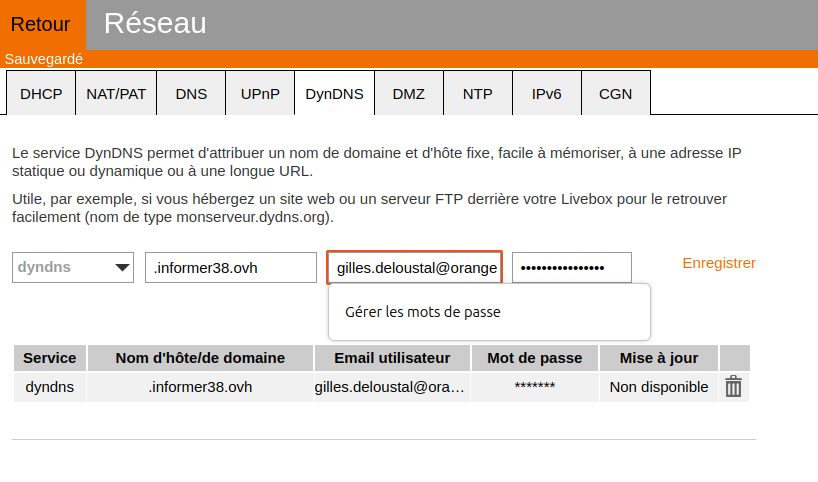
Bonjour
J'accède à mon site installée sur mon ordinateur à partir d'un nom de domaine ovh.
Pour faire face au changement d'IP de ma livebox, j'ai ajouté un dynhost et cliqué sur "gérer les accès" et défini un sous-domaine tld. J'ai désormais un identifiant mondomaine.ovh-tld
1ère question : devais-je préciser un sous-domaine tld ?
2ième question : La documentation de orange précise que je dois préciser le nom d'hôte, l'email et le mot de passe dans le DynDNS de ma livebox. J'ai indiqué mondomaine.ovh, mon email et le mot de passe d'accès à mon compte ovh. Savez-vous si ce sont bien les informations nécessaires à gérer les IP variables ?
Bonsoir
Dans l'étape 2 - Créer l'enregistrement DNS dynamique (DynHost), j'ai mis un * dans le nom du sous-domaine.
Dans l'étape 3 - Automatiser le changement du DynHost, ke dynhost est .mondomaine.ovh
Est-ce .mondomaine.ovh que je dois indiquer à la livebox ?
Etant un des utilisateurs dyndns.org depuis leur tout début, et ayant fait un petit don lorsque c'était encore en mode collaboratif, j'ai eu le statut vip à vie.
Du coup je n'utilise pas OVH.
Montre un peu le dialogue de ta livebox. On n'a pas les mêmes en Belgique.
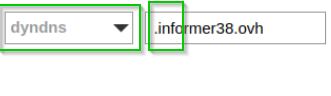
DynDNS est un des opérateurs (et le premier, historiquement parlant) qui offre ce service.
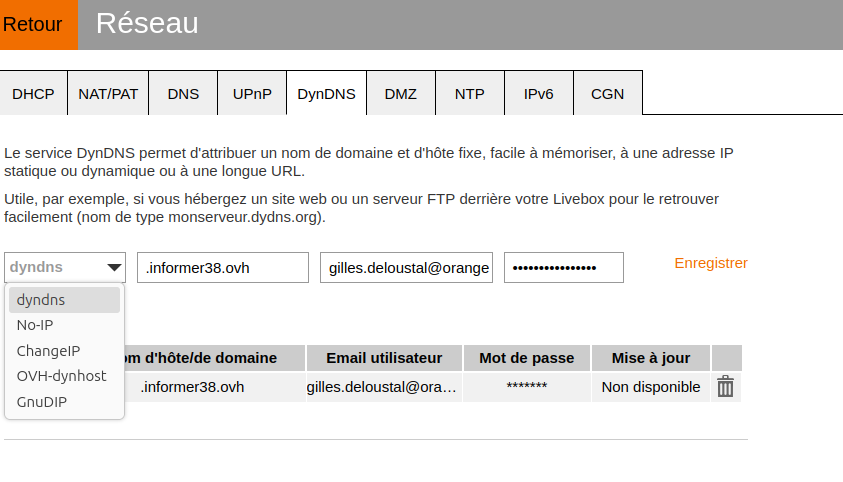
OVH est un autre. Si la livebox ne permet pas de choisir autre chose que DynDNS, alors c'est mort, car la livebox va contacter les mauvais serveurs pour faire une mise à jour.
Si la livebox ne reconnaît rien d'autre que DynDNS , voyez les forums d'utilisateurs Orange, car vous n'êtes certainement pas le seul client Orange à utilier OVH.
Ensuite un hostname ne commence pas par un point. C'est soit 'informer38.ovh' , soit 'serveur.informer38.ovh' .
OVH a justement migré ses guides vers une nouvelle interface, le lien est https://docs.ovhcloud.com/fr/guides/web-cloud/domains/dns-dynhost
N'oubliez pas de consulter tous les onglets.
J'avais mal compris la question. Voici les propositions qui me sont faites par orange. Il y a OVH-dynhost
Dans le sous-domaine, je peux mettre nextcloud pour avoir l'adresse dynhost nextcloud.informer38.ovh
Bizarrement, ayant supprimé le dynhost, l'enregistrement DNS A demeure après que j'ai demandé sa suppression.
Votre problème est donc résolu ?
Non car si mon dynhost est nextcloud.informer38.ovh, c'est aussi le nom de domaine attribué par ovh dans zonedns et ça ne me convient pas car l'accès à mon site se fait par informer38.ovh.
Dans l'étape 2 - Créer l'enregistrement DNS dynamique (DynHost), j'ai donc remis un * dans le nom du sous-domaine et écrit ceci dans ma livebox (sans le point). Est-ce correct ?

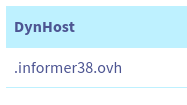
Relisez le guide OVH. Ca ne sert probablement à rien de mettre votre e-mail Orange (et quel mot de passe, d'ailleurs ? celui de votre boîte mail ?)
J'ai beau lire et relire, je ne vois pas de problème dans ce que j'ai fait.
En tout cas, ton site fonctionne, et si je visite une autre adresse (par exemple amontpellier-554-1-97-32.w92-145.abo.wanadoo.fr ) Apache renvoie bien le site Ubuntu par défaut.
Bonjour
Mon site fonctionne bien en effet.
Penses-tu que mon dynhost modifiera l'IP en temps utile ?
Cordialement
Hélas il m'est impossible de répondre.